Loading
Get Uk Warwick Su Xananas Restaurant Staff Shift Availability Form 2017-2026
How it works
-

Open form follow the instructions
-

Easily sign the form with your finger
-

Send filled & signed form or save
How to fill out the UK Warwick SU Xananas Restaurant Staff Shift Availability Form online
Filling out the UK Warwick SU Xananas Restaurant Staff Shift Availability Form is essential for ensuring effective shift scheduling at the restaurant. This guide provides clear, step-by-step instructions for users to complete the form online with ease.
Follow the steps to complete the shift availability form effectively.
- Click the ‘Get Form’ button to access the form and open it in the designated online interface.
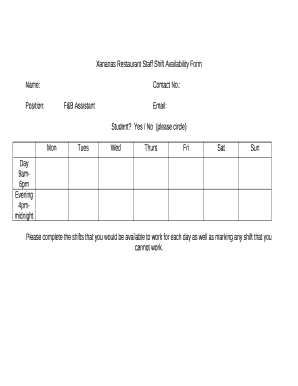
- Begin by entering your personal information in the 'Name' and 'Contact No.' fields. Ensure accuracy as this information is crucial for communication.
- In the 'Position' section, select 'F&B Assistant' to indicate your job role clearly.
- Provide your email address in the designated field; this will be used for any correspondence related to your shifts.
- Indicate whether you are a student by circling 'Yes' or 'No' in the related section.
- For each day of the week (Monday to Sunday), identify your availability by marking the appropriate shifts: '9am to 6pm' for daytime shifts or '4pm to midnight' for evening shifts. It is important to reflect your true availability.
- In addition to marking available shifts, please indicate any shifts you cannot work by noting them clearly, ensuring clarity for the scheduling team.
- Once you have filled out all sections of the form, review your entries for accuracy and completeness.
- After validation, you can save your changes, download, print, or share the form as needed based on the options available in the online interface.
Complete your shift availability form online and ensure your shifts are organized effectively.