Loading
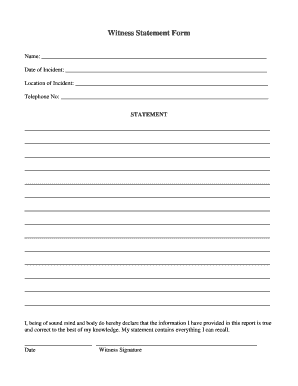
Get Nc Witness Statement Form - Hertford County 2017-2026
How it works
-

Open form follow the instructions
-

Easily sign the form with your finger
-

Send filled & signed form or save
How to fill out the NC Witness Statement Form - Hertford County online
Completing the NC Witness Statement Form online is an essential step for documenting an incident accurately. This guide provides you with comprehensive, step-by-step instructions to help you navigate the form easily and efficiently.
Follow the steps to complete your witness statement form.
- Click the ‘Get Form’ button to access the NC Witness Statement Form and open it in your preferred editor.
- Begin by entering your full name in the designated field. This helps to identify you as the witness to the incident.
- Input the date of the incident in the provided section. Be specific to ensure clarity around the timeline.
- Fill in the location of the incident. Include as much detail as possible to pinpoint where the event occurred.
- Enter your telephone number in the specified field. This allows for follow-up contact if necessary.
- In the statement section, provide a detailed account of what you witnessed. Include all relevant information and descriptions, using as much space as needed.
- Review your statement carefully to ensure all information is accurate and comprehensive. Make any necessary edits or additions.
- Finally, sign and date the form at the bottom, confirming that the information provided is true to the best of your knowledge.
- Save your changes, and you may choose to download or print the completed form for your records. You can also share it as needed.
Start completing your NC Witness Statement Form online today and ensure your account is documented!