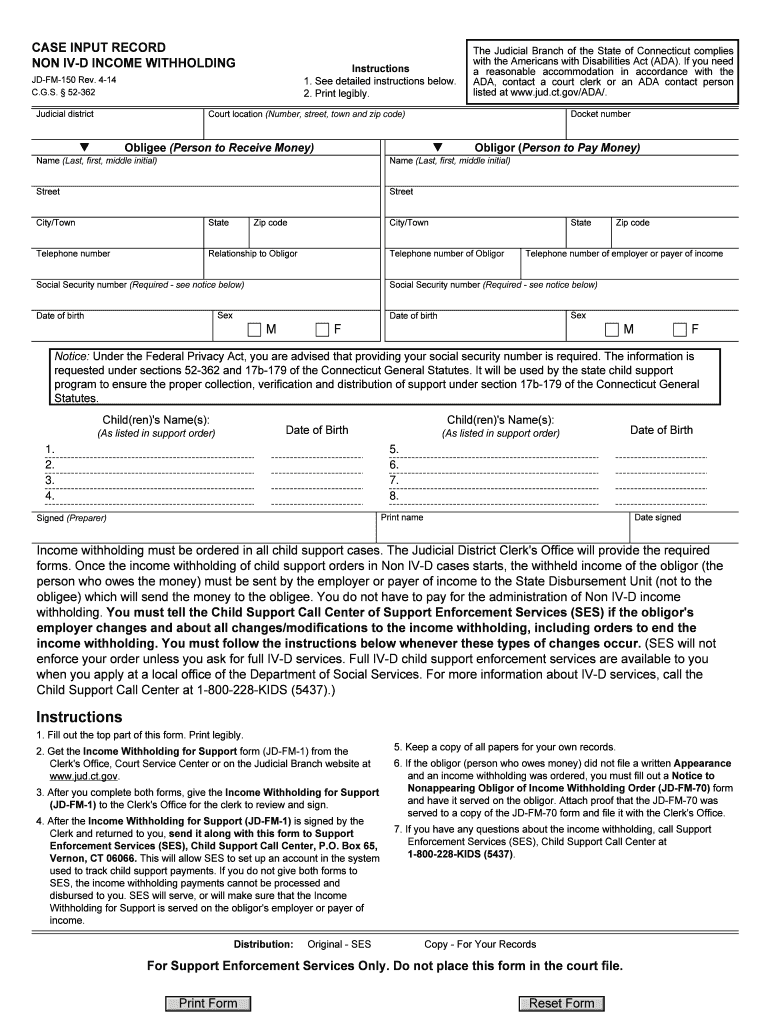
And sign. 4. After the Income Withholding for Support (JD-FM-1) is signed by the Clerk and returned to you, send it along with this form to Support Enforcement Services (SES), Child Support Call Center, P.O. Box 65, Vernon, CT 06066. This will allow SES to set up an account in the system used to track child support payments. If you do not give both forms to SES, the income withholding payments cannot be processed and disbursed to you. SES will serve, or will make sure that the Income Withholdin.
Loading

Open form follow the instructions

Easily sign the form with your finger

Send filled & signed form or save
How to fill out the JD FM 150 Form online
The JD FM 150 Form is essential for initiating income withholding in child support cases within Connecticut. This guide will help you understand how to complete the form online accurately and efficiently.
Follow the steps to fill out the JD FM 150 Form online.
- Click the 'Get Form' button to access the document and open it in your editing tool.
- Begin by filling out the top section of the form, including the judicial district and docket number. Ensure all entries are clear and legible.
- Provide the court location by entering the complete address, including street number, town, and zip code.
- Fill in the details for the obligee, the person receiving the money. This includes the full name, address, and telephone number.
- Next, complete the obligor section with the details of the person required to pay money, including their name, address, relationship to the obligor, and telephone number.
- Include the social security numbers for both the obligee and obligor, as this information is required under federal law.
- Indicate the sex and date of birth for both the obligee and obligor. This information is vital for identification purposes.
- List the names and dates of birth of all relevant children as specified in the child support order.
- Finalize the form by printing your name, signing, and dating it as the preparer.
- After completing the JD FM 150 Form, save your changes, download a copy for your records, and print the necessary documents.
- Ensure you send the completed form along with the Income Withholding for Support form to Support Enforcement Services.
Start filling out your documents online to ensure a smooth process for income withholding.
Experience a faster way to fill out and sign forms on the web. Access the most extensive library of templates available.
Related content
Click a specific link to see all forms in that category or use the search box below to...
Fees are $150 for the course per person. ... If this information is missing or illegible...
The flow meter described in this User's Manual is intended to measure mass flow of fluids...
Get answers to your most pressing questions about US Legal Forms API.
How much can you sue for in Connecticut?
The amount you can sue for in Connecticut depends on the type of case you are pursuing. For small claims, the limit is $5,000, while larger civil cases can involve much higher amounts, sometimes exceeding tens or hundreds of thousands. If you plan to take legal action, understanding your claim's value and the necessary documentation, like the JD FM 150 Form, is critical to a successful outcome. Platforms like USLegalForms can assist you in preparing your case accurately.
What is the maximum for small claims court in CT?
In Connecticut, the maximum amount you can sue for in small claims court is $5,000. This limit includes claims for damages, but does not cover attorney fees or costs associated with the case. Small claims court is designed to be a more accessible and quicker means of resolving disputes. If you plan to file, ensure you understand the required documents, including the JD FM 150 Form, to streamline your process.
Can you sue for pain and suffering in CT?
Yes, you can sue for pain and suffering in Connecticut, as it is considered a compensable damage in personal injury cases. This claim can arise from physical injuries, emotional distress, or other negative impacts caused by someone's negligence. It is essential to provide adequate evidence to support your claim. Utilizing forms like the JD FM 150 Form simplifies the process and helps ensure that you don't miss any critical steps.
How long do you have to file a lawsuit in CT?
In Connecticut, the time limits for filing a lawsuit vary depending on the type of case. Generally, you have one to six years from the date of the incident to file, depending on the circumstances. For instance, personal injury cases usually allow two years, while breach of contract cases can allow up to six years. If you're uncertain, the JD FM 150 Form can help you navigate related legal requirements efficiently.
What forms do I need to file for divorce in CT?
To file for divorce in Connecticut, you typically need to complete several forms, including the JD FM 150 Form. This form provides essential information about your marriage and the grounds for divorce. Additionally, you may need to file a divorce complaint, financial affidavits, and other supporting documents. It is advisable to consult with a legal expert or use a reliable resource like USLegalForms to ensure you have all necessary paperwork.
Who completes the employee's withholding certificate?
The employee is responsible for completing their own withholding certificate, known as the Jd Fm 150 Form. This allows them to accurately disclose their tax situation to the employer. While employers can assist with the process, the ultimate responsibility lies with the employee to provide the correct information for tax withholding purposes.
How to fill out an employee's withholding certificate?
Filling out an employee's withholding certificate involves providing accurate information on the Jd Fm 150 Form. You'll need to input the employee's name, Social Security number, and filing status. It's essential to discuss allowances with the employee to ensure the correct amounts are claimed, which directly impacts tax withholding.
Do I claim 0 or 1 on my W4?
When deciding whether to claim 0 or 1 on your W4, consider your tax situation. Claiming 0 typically results in more tax being withheld from your paycheck, whereas claiming 1 allows for less withholding. Use the Jd Fm 150 Form guidance to determine your allowances based on dependents, deductions, and other income factors.
How to fill out Employee Withholding Certificate form?
To fill out the Employee Withholding Certificate form, or Jd Fm 150 Form, start by entering your name and Social Security number at the top. Next, select your filing status and claim any allowances based on your situation. Remember to sign and date the form before submitting it to your employer, as this confirms the correctness of your information.
What should I fill out for tax withholding?
When filling out the Jd Fm 150 Form for tax withholding, you need to provide your personal information, including your name, address, and Social Security number. Additionally, you must indicate your filing status and any allowances you are claiming. This information helps your employer calculate the correct amount of tax to withhold from your paycheck.
Use professional pre-built templates to fill in and sign documents online faster. Get access to thousands of forms.
If you believe that this page should be taken down, please follow our DMCA take down process here.