Loading
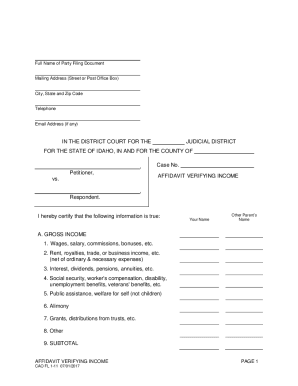
Get Id Cao Fl 1-11 2017-2026
How it works
-

Open form follow the instructions
-

Easily sign the form with your finger
-

Send filled & signed form or save
How to fill out the ID CAO FL 1-11 online
Filling out the ID CAO FL 1-11 form online can be an essential step in documenting your income for various legal and financial procedures. This guide provides clear, step-by-step instructions to help you complete this form accurately and efficiently.
Follow the steps to successfully complete the ID CAO FL 1-11 form online.
- Click the ‘Get Form’ button to retrieve the ID CAO FL 1-11 form and open it in an accessible online editor.
- Enter the full name of the party filing the document in the designated space.
- Fill in your mailing address, including street or post office box, city, state, and zip code.
- Provide your telephone number and email address, if available.
- For the section labeled 'Petitioner', enter the name of the party initiating the process.
- Assign a 'Case No.' if you have one; otherwise, leave this blank.
- In the 'Gross Income' section (A), fill out the various sources of income by listing wages, rental income, etc., in the appropriate fields.
- Complete section B for deductions from gross income, indicating any relevant expenses or other deductions.
- Calculate 'Gross Income, as adjusted' in section C by subtracting the deductions subtotal from the gross income subtotal.
- List any 'In-Kind Benefits' you receive in section D, such as housing and food.
- In section E, provide estimates for potential income, detailing potential earned and unearned income.
- Calculate the 'Guidelines Income' in section F by adding the figures in sections C, D, and E.
- Determine the 'Monthly I.C.S.G. Income' in section G by dividing the total from section F by 12 months.
- Date the form and provide your typed or printed name as well as your signature in the certification section.
- Finally, review the completed form for accuracy, save your changes, and choose to download, print, or share the form as needed.
Complete your ID CAO FL 1-11 form online today to streamline your document management process.
The copyright notice generally consists of three elements: The symbol © (the letter C in a circle), or the word "Copyright" or the abbreviation "Copr."; The year of first publication of the work; and. The name of the owner of copyright in the work.