Loading
Get Oh Shr-web Check 2018-2026
How it works
-

Open form follow the instructions
-

Easily sign the form with your finger
-

Send filled & signed form or save
How to fill out the OH SHR-Web Check online
The OH SHR-Web Check is an essential document used for conducting background checks in Ohio. This guide will provide you with clear and concise instructions on how to effectively complete the online form to ensure your submission is processed smoothly.
Follow the steps to successfully complete the OH SHR-Web Check online.
- Press the ‘Get Form’ button to obtain the OH SHR-Web Check and open it in your preferred editor.
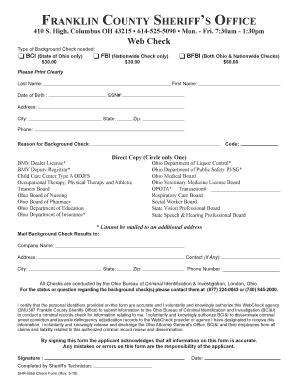
- Fill in your personal information clearly. Begin with your last name, followed by your first name. Ensure that you provide your date of birth and social security number accurately.
- Enter your current address, including the city, state, and zip code. Additionally, provide your contact phone number for any necessary follow-up.
- Select the type of background check you require by checking the appropriate box: BCI (State of Ohio only), FBI (Nationwide Check only), or BFBI (Both Ohio & Nationwide Checks). Note the associated fees for each option.
- Indicate the reason for the background check by selecting the appropriate code from the provided list. Circle only one option that best describes your need.
- If necessary, provide the address where the background check results should be mailed, including the company name, address, city, state, zip, and any contact person.
- Read and understand the authorization statement. By signing, you affirm that the information you provided is accurate and you grant permission for the background check to be conducted.
- Sign and date the form to affirm your consent and acknowledgment of the responsibilities associated with this form.
- After completing the form, save your changes and then download, print, or share the form as required for submission.
Complete your document forms online to streamline your background check process.