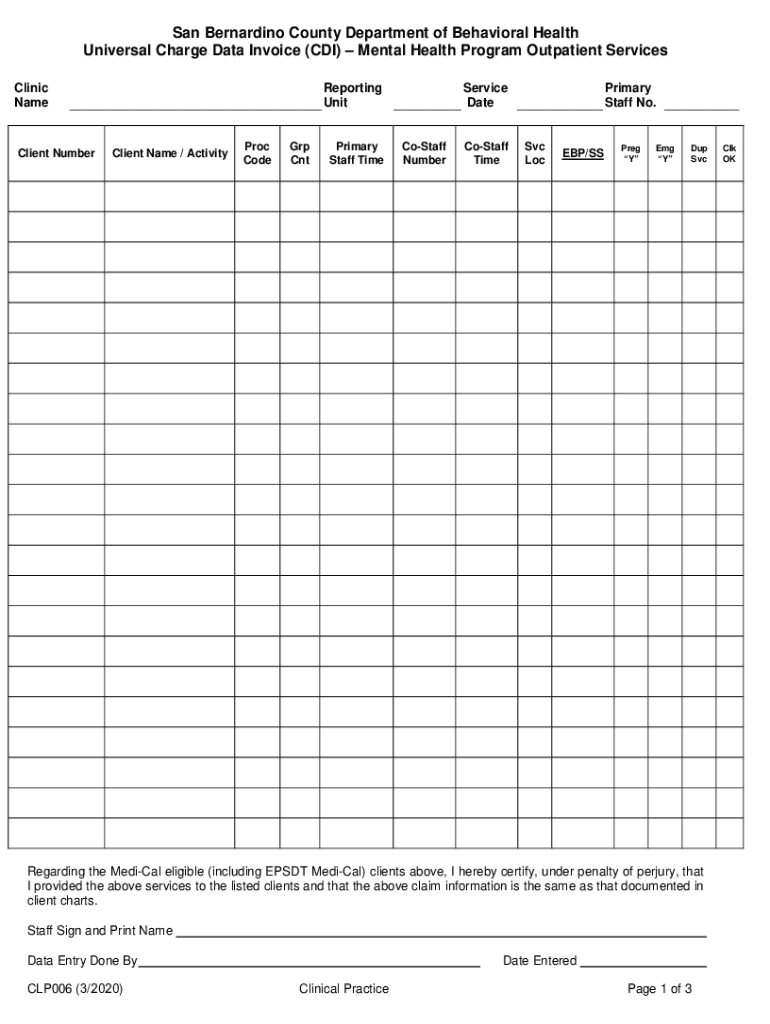
San Bernardino County Department of Behavioral Health Universal Charge Data Invoice (CDI) Mental Health Program Outpatient Services Clinic NameClient NumberReporting UnitClient Name / ActivityProc.

Open form follow the instructions

Easily sign the form with your finger

Send filled & signed form or save
How to fill out the CA CLP006 - San Bernardino County online
The CA CLP006 form is an essential document for the San Bernardino County Department of Behavioral Health that facilitates accurate billing and data tracking for mental health outpatient services. This guide provides clear instructions on how to fill out the form online, ensuring users can complete it efficiently and accurately.
Follow the steps to complete the CA CLP006 form accurately.
- Click ‘Get Form’ button to acquire the form and open it in your preferred online editor.
- Enter the clinic name as it officially appears in your records, ensuring there are no spelling errors.
- Input the reporting unit, which is the tracking number for your specific site or service type in the billing system.
- Fill in the service date — this is the date the billed service was provided.
- Provide the primary staff number, which is the billing system number assigned to the primary service staff member delivering the service.
- Record the client number, which corresponds to the client's registration number in the billing system.
- Insert the client name exactly as it appears in their medical record, maintaining accuracy for billing purposes.
- Enter the appropriate procedure code associated with the service provided, ensuring it matches the code in the chart note heading.
- Include the group count to reflect how many clients were involved in the group service.
- Document the primary staff time spent on the service and related documentation, specifying time as accurately as possible in minutes.
- If co-staff were involved, record the co-staff number and their corresponding time spent on the service.
- Select the service location based on codes provided; ensure this corresponds with the interdisciplinary note.
- Indicate any evidence-based practice or service strategies applied, noting up to three codes.
- Mark the pregnancy indicator with ‘Y’ if the client qualifies under pregnancy services.
- Check the emergency indicator as ‘Y’ if applicable, specifically for emergency services provided.
- If multiple services were provided on the same day, apply the duplicate code for subsequent entries.
- Utilize the check box for 'Clk. OK' to confirm accuracy as the clerical staff would during data entry.
- Sign and print the staff signature to certify that all information is accurate and complies with legal requirements.
- Complete the fields for data entry done by, documenting who entered the information and the date it was entered.
- Finally, save changes, download, print, or share the form as necessary once all information is accurate.
Complete the CA CLP006 form online today to streamline your mental health service billing process.
Experience a faster way to fill out and sign forms on the web. Access the most extensive library of templates available.
Related content
Block form is the Inspector sidebar. Click the “Switch to Edit / Switch to...
by NHF Beebe · 2012 — ... County [CRPZ06]. Coupling [Van04]. Course [Dei08, Hei03...
CLP006. pdf, Charge Data Invoice, 02/15/2022 ... Click the “Switch to Edit / Switch to...
Get answers to your most pressing questions about US Legal Forms API.
Who is the head of San Bernardino County?
Luther Snoke was appointed Chief Executive Officer on September 12, 2023. Mr.
Who is the director of behavioral health in San Bernardino County?
Georgina Yoshioka is San Bernardino County's new behavioral health director. Yoshioka, who served as interim behavioral health director since December 2021, was appointed by the county Supervisors.
Who is the director of behavioral health in Solano County?
BH Director - Emery Cowan, LPCC, LMHC. BH Assistant Director - Jennifer Mullane, LPCC, M-RAS.
What is the mission statement of the DBH?
OUR MISSION The mission of DBH is to develop, manage and oversee a public behavioral health system for adults, children and youth and their families that is consumer driven, community based, culturally competent and supports prevention, resiliency and recovery and the overall well being of the District of Columbia.
What is the structure of San Bernardino County government?
Formed in 1853, San Bernardino County is a charter county and divided into five districts based on population. The County is governed by a five-member Board of Supervisors whose members serve four-year terms.
Use professional pre-built templates to fill in and sign documents online faster. Get access to thousands of forms.
If you believe that this page should be taken down, please follow our DMCA take down process here.