Loading
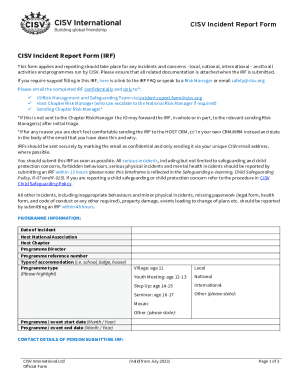
Get Cisv Incident Report Form 2023-2026
How it works
-

Open form follow the instructions
-

Easily sign the form with your finger
-

Send filled & signed form or save
How to fill out the CISV Incident Report Form online
Filling out the CISV Incident Report Form online is a crucial step in reporting incidents and concerns within CISV activities. This guide provides clear instructions to help users accurately complete the form, ensuring all necessary details are captured.
Follow the steps to complete the CISV Incident Report Form online.
- Press the ‘Get Form’ button to access the CISV Incident Report Form and open it in your online editor.
- Begin by filling out the programme information section. Include the date of the incident, the Host National Association, Host Chapter, Programme Director, and reference number. Specify the type of accommodation and programme type, highlighting the relevant category.
- Next, provide your contact details. Include your role in the CISV programme, given name, surname, national association, chapter, telephone number, and your unique MyCISV email address.
- In the incident details section, list the parties involved. Provide full names, ages if applicable, chapter affiliation, CISV roles, and their involvement in the incident (witness, injured, etc.).
- Describe the incident in detail, including dates, times, and a chronological account of what occurred. Mention who was involved and any witnesses present.
- Document any immediate actions taken, including who performed them, the date, and a description of the actions. This is crucial for understanding the response to the incident.
- If applicable, detail communication with parents or guardians if a child was involved, including their contact information and rationale for contact.
- If there was a medical incident, attach any relevant medical reports and information about where treatment was received, including physician details and prescribed medications.
- Provide details on any authorities involved, including police reports or social service referrals, and mention if any media was present during the incident.
- Before submitting, fill out the recipient information for the Host Chapter Risk Manager and include the date of submission. Ensure all fields are accurately completed.
- Once all information is filled out, you can save changes, download the form, print it, or share it as necessary.
Begin filling out your CISV Incident Report Form online today to ensure a thorough and prompt report.
Related links form
Instructions: Use This Form To Request A New SAP User ID, Make Changes To A SAP User ID, Or Delete
Acting Evaluation Form - Houston Independent School District - Houstonisd
Checklist For Planning Your Alpha Course - Alberta 2013 - Alberta2013
MF2762 Back Injury Prevention For The Fruit And Vegetable Preserving And Specialty Foods