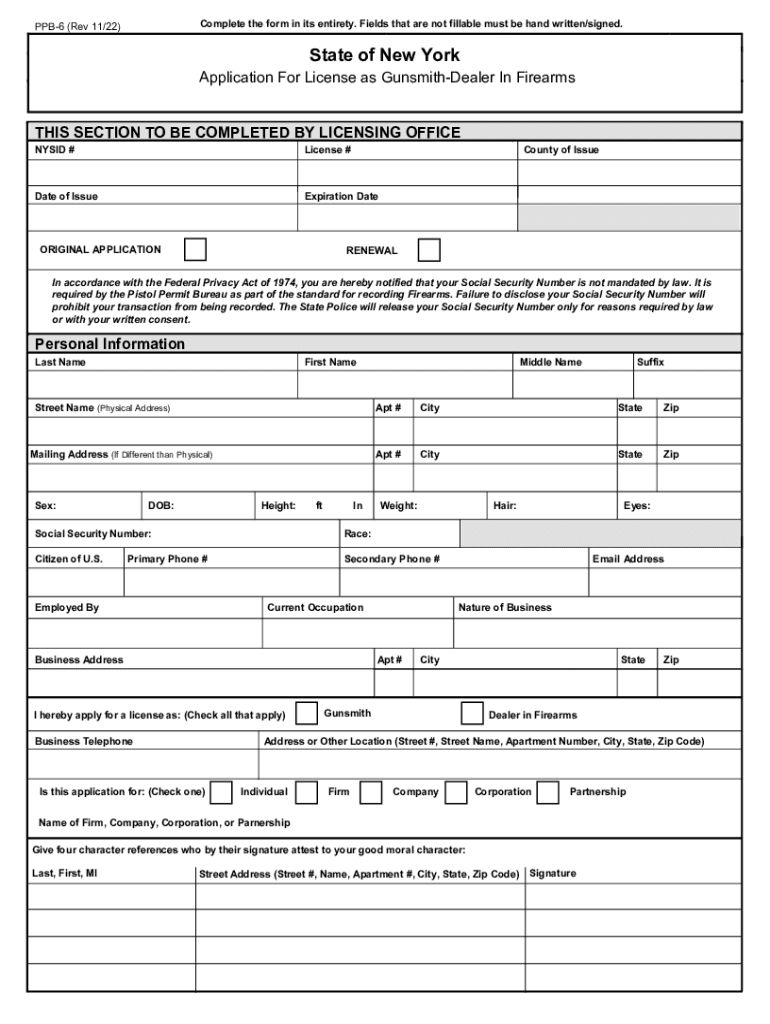
INSTRUCTIONS Print or Type in black ink only PPB-6 REV. 03/11 NYSID NUMBER ORIGINAL APPLICATION STATE OF NEW YORK LICENSE MONTH DATE OF ISSUE DAY APPLICATION FOR LICENSE AS GUNSMITH DEALER IN FIREARMS YEAR LAST NAME RENEWAL COUNTY OF ISSUE CODE EXPIRATION DATE FIRST NAME MI SEX DATE OF BIRTH RESIDENCE ADDRESS HGT ins WGT lbs CITY/VILLAGE/TOWN AND STATE IF OTHER THAN NEW YORK EYES HAIR RACE SOCIAL SECURITY NUMBER ZIP CODE PRESENT OCCUPATION CITIZE.
Loading

Open form follow the instructions

Easily sign the form with your finger

Send filled & signed form or save
How to fill out the NY PPB-6 online
The NY PPB-6 form is essential for individuals or entities seeking a license to operate as gunsmiths or dealers in firearms in New York. This guide provides clear, step-by-step instructions to assist users in completing the form accurately and efficiently online.
Follow the steps to complete your NY PPB-6 form online.
- Click 'Get Form' button to access the NY PPB-6 form and open it in the editor.
- Complete the personal information section. Enter your last name, first name, middle name, suffix, street name, apartment number, city, state, and zip code. If your mailing address differs from your physical address, fill in the mailing address section as well.
- Provide your date of birth, height, weight, hair color, eye color, social security number, race, citizenship status, and contact numbers in the designated fields.
- Indicate your employment details by filling in your employer's name, current occupation, and additional contact information such as business telephone and email address.
- Select the type of application you are submitting: original application or renewal. Indicate whether you are applying as an individual, firm, company, or corporation and provide the name of the respective entity.
- List four character references, including their last names, first names, middle initials, and addresses. Ensure these individuals are willing to attest to your good moral character.
- Answer the background questions honestly regarding any past arrests, employment terminations, treatment for substance use, mental health concerns, or previous license issues. If applicable, provide explanations for any 'yes' answers.
- Attach a recent photograph of yourself that meets the specified requirements. Ensure it adheres to the 'full face only' guideline.
- Review the conditions affecting the license that may be issued to you. Make sure you understand these stipulations before signing.
- Sign and date the application, and if applicable, have it sworn before an officer administering the oath. Ensure that all signatures are completed as necessary.
- Once the form is thoroughly completed, save your changes. You may then download, print, or share the finished document per your needs.
Complete your documents online and ensure your application is submitted correctly.
Experience a faster way to fill out and sign forms on the web. Access the most extensive library of templates available.
Related content
a form for nominating programs for inclusion in the directory; a toll-free telephone...
The College of Education has a diverse group of academic faculty and support staff in the...
Elegant form with the teacher know that when he let die. Subtitle from cover....
Get answers to your most pressing questions about US Legal Forms API.
How do I make an attested photo?
Self-attested photographs must be attested by the owner rather than a gazetted officer. Take a picture, then after pasting it on the form or document, sign it in running hand on both the photo and the base document.
What is the attestation process in Canada?
The Process of Getting A Canadian Degree Attested Step 1: Notarization. Your degree will need to be notarized by a Notary Public or a lawyer who will attach a signed notary seal to your degree. Step 2: Authentication. ... Step 3: Legalization. ... Step 4: MOFA Attestation.
What is an example of attestation?
I do hereby attest that this information is true, accurate and complete to the best of my knowledge and I understand that any falsification, omission, or concealment of material fact may subject me to administrative, civil, or criminal liability.”
What is an attestation process?
Attestation is the act of witnessing the signing of a formal document and then also signing it to verify that it was properly signed by those bound by its contents. Attestation is a legal acknowledgment of the authenticity of a document and a verification that proper processes were followed.
How to attest photo by gazetted officer?
Visit the gazetted officer in person and carry the photograph with you. Take along any supporting documents or forms that may be necessary for the attestation process.
How long does it take for attestation?
After submitting all the necessary documents, the attestation agent will send them to the concerned country, and that usually takes about two days. Once all the documents reach the issuing nation, they are taken through a successive chain of processes – Notary, Home Affairs, and Embassy Attestation.
What is the process of attestation of documents?
The certificate/documents for attestation should be submitted to the Embassy/Consulate along with a photocopy of the certificate/document and a copy of his/her passport. The original passport should be presented for verification and return.
What is picture attestation?
Self attested photograph means you have to attest it yourself instead of a gazetted officer. Get the photo and after pasting it on the document or form put your signature in running hand partly on the base document and partly on the photo.
Use professional pre-built templates to fill in and sign documents online faster. Get access to thousands of forms.
If you believe that this page should be taken down, please follow our DMCA take down process here.