Loading
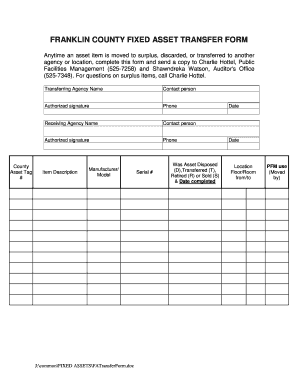
Get Oh Fixed Asset Transfer Form - Franklin County 2013-2026
How it works
-

Open form follow the instructions
-

Easily sign the form with your finger
-

Send filled & signed form or save
How to fill out the OH Fixed Asset Transfer Form - Franklin County online
The OH Fixed Asset Transfer Form - Franklin County serves as a crucial document for managing the transfer, disposal, or retirement of county assets. This guide will walk you through each section of the form, ensuring a smooth online filling process.
Follow the steps to complete the form accurately.
- Click ‘Get Form’ button to obtain the form and open it for editing.
- Enter the 'County' in the specified field. This identifies the county responsible for the asset transfer.
- Fill in the 'Asset Tag #' section with the unique identifier assigned to the asset being transferred.
- In the 'Transferring Agency Name' field, provide the name of the agency that currently holds the asset.
- Add the 'Contact person' for the transferring agency, ensuring this individual is reachable for follow-up.
- Input the 'Authorized signature' of the individual approving the transfer from the transferring agency.
- Include the phone number of the contact person for the transferring agency.
- Now, input the 'Receiving Agency Name' where the asset will be transferred.
- Provide the 'Contact person' for the receiving agency, again ensuring they can be contacted.
- Insert the 'Authorized signature' of the individual who is officially receiving the asset.
- Enter the phone number of the contact person for the receiving agency.
- Complete the 'Item Description' to detail what the asset is. Be concise yet descriptive.
- Fill in the 'Manufacturer/Model' fields to provide additional details about the asset.
- Input the 'Serial #' of the asset, which further identifies it.
- Select whether the Asset was 'Disposed (D)', 'Transferred (T)', 'Retired (R)', or 'Sold (S)' and include the date this action was completed.
- Enter the date the transfer is initiated.
- Fill in the 'Location Floor/Room from/to' to indicate where the asset is moving between.
- In the 'PFM use (Moved by)' section, document who performed the move for internal records.
- Once all fields are completed, you can save changes to the form, download a copy, print, or share it as needed.
Complete your OH Fixed Asset Transfer Form online today!