Loading
Get Ny Dos-1390-f 2017-2026
How it works
-

Open form follow the instructions
-

Easily sign the form with your finger
-

Send filled & signed form or save
How to fill out the NY DOS-1390-f online
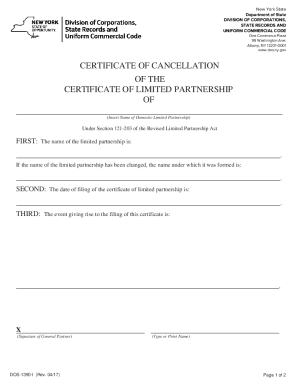
This guide will assist you in completing the NY DOS-1390-f form, which is the Certificate of Cancellation for the Certificate of Limited Partnership. Following these steps will ensure that you accurately fill out the form online with ease.
Follow the steps to complete the NY DOS-1390-f form successfully.
- Click the ‘Get Form’ button to access the form and open it in the online editor.
- In the first section, enter the name of the limited partnership. If the name has changed, specify the name under which it was originally formed.
- Provide the date on which the certificate of limited partnership was filed. Ensure this date matches exactly with the records in the Department of State.
- Describe the event that necessitated the filing of this certificate. Be specific and complete in your description.
- Have the general partner sign the form where indicated. This signature confirms that the information provided is accurate.
- Fill out the filer’s name and mailing address section. Include the name of the person or entity and their respective mailing address, city, state, and zip code.
- Review all entered information for accuracy and completeness, ensuring compliance with the Department of State's guidelines.
- Once completed, save your changes, and then you can download, print, or share the form as needed.
Start filing your documents online today and ensure your compliance with state regulations.
One member (owner) of the LLC must sign the Certificate of Cancellation. Pay the cancellation and preparation service fees, as well as the current year's Delaware Franchise Tax Fee. File the Certificate of Cancellation.