Loading
Get Canada Alberta Health Services Cr 306 2011
How it works
-

Open form follow the instructions
-

Easily sign the form with your finger
-

Send filled & signed form or save
How to fill out the Canada Alberta Health Services CR 306 online
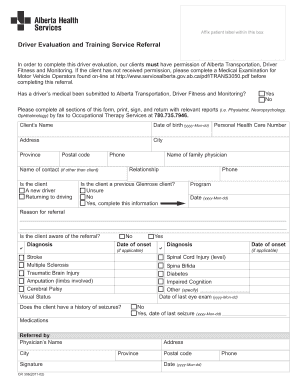
The Canada Alberta Health Services CR 306 form is essential for initiating a driver evaluation and training service referral. This guide provides clear and systematic instructions to help you navigate and complete the form accurately.
Follow the steps to fill out the Canada Alberta Health Services CR 306 effectively.
- Click ‘Get Form’ button to obtain the form and open it for editing.
- Fill in the client's name as it appears on official documents.
- Enter the date of birth in the format yyyy-Mon-dd to ensure proper identification.
- Provide the personal health care number, which is crucial for health records.
- Complete the address, including city, province, and postal code, to establish the client's location.
- Enter a contact phone number for effective communication.
- Indicate the relationship to the client if the contact is not the client themselves.
- Specify whether the client is a new driver or returning to driving.
- Provide the name and phone number of the family physician for any medical inquiries.
- Answer whether the client is a previous Glenrose client by selecting the appropriate option.
- Fill in the program details and the relevant date in the format yyyy-Mon-dd.
- State the reason for the referral clearly.
- Confirm if the client is aware of the referral by selecting 'Yes' or 'No'.
- List any relevant diagnoses and their dates of onset if applicable.
- Provide the date of the last eye exam in the format yyyy-Mon-dd.
- Indicate if the client has a history of seizures and provide the date of the last seizure if applicable.
- List any medications the client is currently taking.
- Provide the name and city of the referring physician, along with their signature and the date in the format yyyy-Mon-dd.
- Finally, review the completed form for accuracy, then print it, sign it, and return it with any relevant reports to the appropriate Occupational Therapy Services fax number.
Start filling out your form online today to ensure a smooth driver evaluation process!
Get form
Experience a faster way to fill out and sign forms on the web. Access the most extensive library of templates available.
Get This Form Now!
Use professional pre-built templates to fill in and sign documents online faster. Get access to thousands of forms.