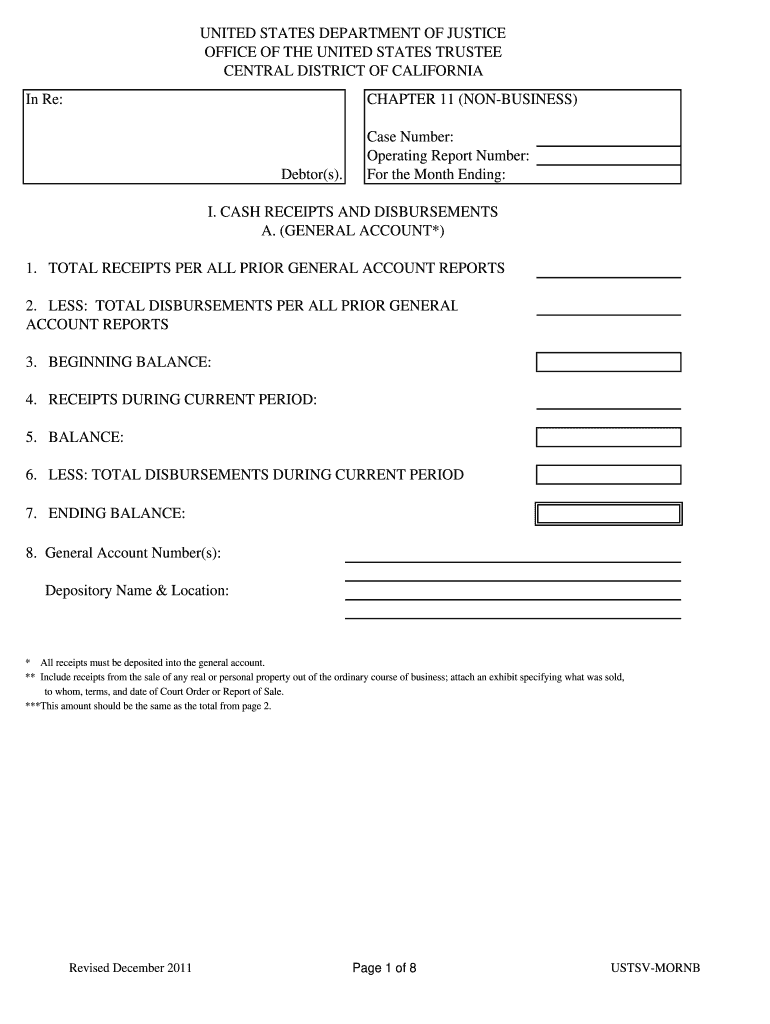
Debtor(s). Case Number: Operating Report Number: For the Month Ending: I. CASH RECEIPTS AND DISBURSEMENTS A. (GENERAL ACCOUNT*) 1. TOTAL RECEIPTS PER ALL PRIOR GENERAL ACCOUNT REPORTS 2. LESS: TOTAL DISBURSEMENTS PER ALL PRIOR GENERAL ACCOUNT REPORTS 3. BEGINNING BALANCE: 4. RECEIPTS DURING CURRENT PERIOD: 5. BALANCE: 6. LESS: TOTAL DISBURSEMENTS DURING CURRENT PERIOD 7. ENDING BALANCE: 8. General Account Number(s): Depository Name & Location: * All receipts must be deposited into the gener.
Loading

Open form follow the instructions

Easily sign the form with your finger

Send filled & signed form or save
How to fill out the CA USTSV-MORNB online
This guide provides clear, step-by-step instructions for filling out the CA USTSV-MORNB online. Designed for ease of use, it aims to assist users regardless of their experience level.
Follow the steps to complete the CA USTSV-MORNB form.
- Click the 'Get Form' button to access the CA USTSV-MORNB form and open it in your preferred editor.
- Begin by entering the case number, operating report number, and the month ending date at the top of the form.
- In section I, provide your cash receipts and disbursements. Ensure you fill in the total receipts and disbursements from previous reports accurately.
- Calculate the current period receipts and disbursements, then determine your beginning and ending balances using the provided fields.
- Complete the general account section by detailing the general account number(s) and the depository name and location.
- Proceed to fill out the total disbursements from the general account for the current period, indicating the date, check number, payee, purpose, and amount for each transaction.
- Move on to the bank reconciliation section. Document the bank statement date, balance, deposits in transit, outstanding checks, and any necessary adjustments.
- Address the status of payments to secured creditors, lessors, and parties to executory contracts, documenting the frequency and amounts of payments due.
- Fill in the insurance coverage section with information about your coverage providers, amounts, expiration dates, and premiums paid.
- Summarize your cash available, paying attention to providing details on each account and petty cash transactions.
- Complete the section on United States Trustee quarterly fees by entering total disbursements, amounts paid, and still owing.
- Fill out the schedules of compensation paid to insiders and any other amounts paid during the month, ensuring clarity in amounts and descriptions.
- Answer the questionnaire at the end of the form, addressing each question thoroughly and providing any necessary explanations.
- Finally, review all entries for accuracy before signing the declaration section. Ensure you understand the information provided is true and complete.
- Once complete, save your changes, and opt to download, print, or share the filled form as required.
Ready to file your documents online? Complete the CA USTSV-MORNB form today.
Experience a faster way to fill out and sign forms on the web. Access the most extensive library of templates available.
Related content
Jan 12, 2012 — The Post Confirmation Quarterly Status Reports (USTSV-PCR) are required...
M arquette, Mich., May 22.—Anoth. e r grazer—R obert Burton of Missouri. —w ho came...
Get answers to your most pressing questions about US Legal Forms API.
How to fill out California resale certificate?
Filling out a California resale certificate requires you to provide details such as your business name, address, and the seller's information. It’s important to include the type of items you are buying for resale and ensure all information is current and accurate. Mistakes can lead to compliance issues, so using US Legal's services can provide clarity and assist in completing the form correctly.
How hard is it to terminate guardianship in California?
Terminating guardianship in California can be challenging, as it requires you to demonstrate that the current arrangement no longer serves the best interests of the child. You will need to file a petition in court and may have to attend hearings to justify the change. Each case is unique, and having legal advice can be beneficial. US Legal can help guide you through this process with the right resources.
What form is needed to terminate parental rights in California?
To terminate parental rights in California, you typically need to file the Request to Terminate Parental Rights form. This process is complex and necessitates a valid legal reason, as well as court approval. It is critical to ensure that all required documentation is submitted correctly, which can be facilitated through tools provided by US Legal. Using their platform can simplify this often daunting process.
How to fill out GC 210 CA?
Filling out GC-210 CA requires you to provide specific information about the minor, the proposed guardian, and the reasons for guardianship. You should ensure that all sections are completed accurately, as omissions can delay the process. After completing the form, you will need to file it with the court and potentially attend a hearing. For a step-by-step guide, check the resources available on US Legal.
What is GC-210 CA?
GC-210 CA is a legal form used in California to request the appointment of a guardian for a minor. This form plays an important role in guardianship cases, as it helps establish a legal relationship between the guardian and the child. It is particularly essential when parents are unable to care for their child due to various circumstances. If you need further assistance with GC-210 CA, consider using the US Legal platform for guidance.
Can you file CA statement of Information online?
Absolutely, you can file the CA Statement of Information online. The California Secretary of State provides an online system for this purpose, ensuring that the process is straightforward. Simply log into the website, follow the steps provided, and submit your information. Using the CA USTSV-MORNB service can help ensure that you complete your filing accurately and on time.
Can I file a California statement of Information online?
Yes, you can file a California Statement of Information online through the California Secretary of State's website. The online platform allows for a quick and efficient way to submit your information. Make sure you have all the required details before starting the process to avoid delays. For a more guided experience, explore the CA USTSV-MORNB service, which can assist you with online filings.
How to file California corporate disclosure statement online?
To file a California corporate disclosure statement online, visit the California Secretary of State's website and navigate to the appropriate section for business filings. You will need to create an account or log in to access the online filing system. Follow the prompts to complete your filing, ensuring you have all necessary information ready. The CA USTSV-MORNB platform can simplify this process for you by providing step-by-step guidance.
How often do you file a statement of Information for a corporation in California?
In California, corporations must file a Statement of Information every year or biennially, depending on their classification. The due date is typically set for the last day of the month in which the Articles of Incorporation were filed. Staying on top of these filings is crucial to maintaining your corporation's good standing. Utilize the CA USTSV-MORNB service for reminders and assistance with your filings.
Where do I file Articles of Incorporation in California?
You file Articles of Incorporation in California with the Secretary of State's office. It's essential to submit your application electronically, by mail, or in person as specified on the form. You can find forms and additional information on the California Secretary of State's website. The CA USTSV-MORNB platform offers resources to guide you through filing Articles of Incorporation effectively.
Use professional pre-built templates to fill in and sign documents online faster. Get access to thousands of forms.
If you believe that this page should be taken down, please follow our DMCA take down process here.