Loading
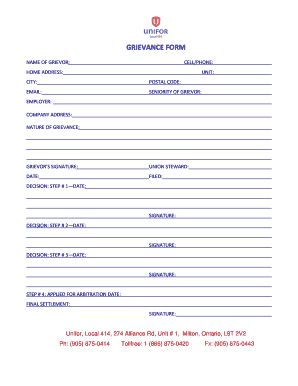
Get Canada Unifor Local 414 Grievance Form 2017
How it works
-

Open form follow the instructions
-

Easily sign the form with your finger
-

Send filled & signed form or save
How to fill out the Canada Unifor Local 414 Grievance Form online
Filing a grievance is an important step in addressing workplace issues. This guide will walk you through the process of completing the Canada Unifor Local 414 Grievance Form online, ensuring clarity and ease as you navigate each section of the form.
Follow the steps to complete the grievance form successfully.
- Click ‘Get Form’ button to obtain the form and open it in the editor. This will allow you to access the necessary fields to complete your grievance form.
- Begin by entering your name in the 'Name of grievor' field. This is essential as it identifies the person submitting the grievance.
- Next, provide your cell phone number in the 'Cell/Phone' field. This information is crucial for communication purposes.
- Input your home address in the 'Home Address' section, including the unit number if applicable, to ensure your grievance is processed correctly.
- Fill in the 'City' and 'Postal Code' fields to provide your locale for records.
- Enter your email address in the designated field for electronic communication.
- Specify your seniority level as the 'Seniority of grievor.' This can affect the handling of your grievance based on the duration of your employment.
- State the name of your employer in the 'Employer' field and follow it with the 'Company Address.' This helps to identify where the grievance is directed.
- Describe the nature of your grievance in the 'Nature of Grievance' section. Be as detailed as possible to facilitate understanding.
- Sign the form in the 'Grievor’s Signature' field to validate your grievance.
- If applicable, write the name of your union steward who is assisting you in the grievance process.
- Indicate the date of filing in the 'Filed' section.
- The decision-making process will require signatures and dates for each decision step outlined; ensure all necessary fields are filled appropriately.
- Complete the final sections regarding arbitration and settlement by filling in the relevant dates and signatures as required.
- Once all fields have been completed, you can save your changes, download, print, or share the form as necessary.
Complete your grievance form online today to ensure your voice is heard.
Get form
Experience a faster way to fill out and sign forms on the web. Access the most extensive library of templates available.
Typically, four types of grievances in the workplace are raised by employees: Complaints about unsatisfactory working conditions. Concerns or disputes relating to payment or benefits. Frustration with too much work. Feeling unhappy due to bullying, harassment, discrimination in the workplace or other factors.
Get This Form Now!
Use professional pre-built templates to fill in and sign documents online faster. Get access to thousands of forms.