Loading
Get Ca Tr-505 S 2013-2026
How it works
-

Open form follow the instructions
-

Easily sign the form with your finger
-

Send filled & signed form or save
How to fill out the CA TR-505 S online
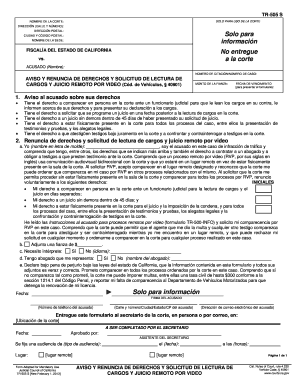
Filling out the CA TR-505 S form correctly is essential for navigating your court-related traffic issues. This guide will provide you with clear, step-by-step instructions to complete the form online, ensuring that you understand each section's requirements.
Follow the steps to complete the CA TR-505 S online
- Click ‘Get Form’ button to access the CA TR-505 S form and open it in your preferred editor.
- Begin by entering the name of the court in the designated field. Ensure that you input the full name of the court handling your case.
- Provide the court's address, including street and number. This information is crucial for accurate identification of the court location.
- Next, fill in the postal address of the court if it differs from the physical address provided earlier.
- Enter the city and postal code where the court is located in the appropriate fields.
- Indicate the name of the courthouse or branch handling your case.
- Input your name as the accused, ensuring it is written clearly and correctly.
- Enter the citation number or the case number associated with your traffic violation in the specified field.
- In the 'Amount of bail' section, specify the total bail amount as applicable to your case.
- Provide the deadline date for submitting the form to ensure it is filed on time.
- Read the notices regarding your rights carefully and acknowledge your understanding by providing your initials where prompted.
- Complete the waiver section by signing your name and date, confirming your request for remote video proceedings.
- Include any necessary attachments that may be required, such as proof of your bail amount.
- Indicate whether you need an interpreter and specify the language if applicable.
- Confirm if you have legal representation by providing the attorney's name if yes; if not, indicate accordingly.
- Finally, review all entered information for accuracy. Once verified, save your changes, download, print, or share the completed form accordingly.
Complete your CA TR-505 S form online today to ensure timely processing of your case.
Terminating guardianship in California can be a complex process, but it's manageable with the right approach. You must file the appropriate legal forms, such as CA TR-505 S, and present valid reasons to the court. Consulting with legal professionals or using resources like USLegalForms can significantly help simplify this process.