Loading
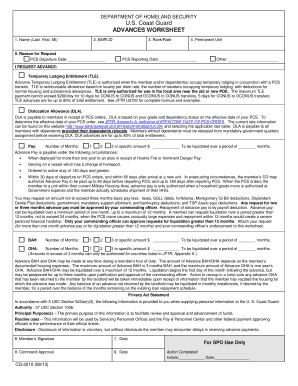
Get Advances Worksheet - Uscg
How it works
-

Open form follow the instructions
-

Easily sign the form with your finger
-

Send filled & signed form or save
How to use or fill out the ADVANCES WORKSHEET - Uscg online
The Advances Worksheet - Uscg is an essential document for U.S. Coast Guard members requesting financial advances related to permanent change of station (PCS) orders. This guide provides clear, step-by-step instructions to help you complete the form online effectively and accurately.
Follow the steps to complete the Advances Worksheet - Uscg.
- Press the ‘Get Form’ button to access the Advances Worksheet - Uscg and open it in an online editing tool.
- Begin by entering your name in the designated field: fill in your last name, first name, and middle initial.
- Input your employee ID (EMPLID) in the specified section for identification purposes.
- Indicate your rank or rate in the provided field to clarify your service status.
- Select the reason for your request from the options available, such as Temporary Lodging Entitlement (TLE), Dislocation Allowance (DLA), or Pay. Make sure to fill in the necessary dates for your PCS departure and reporting.
- If requesting TLE, provide details about your temporary lodging and the number of days, up to the maximum allowed, and ensure you understand reimbursement limits.
- For DLA, check your dependent status and provide your grade to receive the correct allowance. You may refer to the appropriate rate table online for guidance.
- If requesting advance pay, specify the number of months needed and the specific amount if applicable. Remember to note the repayment period.
- Complete the section for BAH (Basic Allowance for Housing) or OHA (Overseas Housing Allowance), detailing the number of months and required amounts.
- Review the Privacy Act Statement to understand how your information is handled and make sure you comply with its requirements.
- Sign and date the form in the designated areas, ensuring your commanding officer’s approval is also obtained.
- Once your form is completed, save any changes made. You can also choose to download, print, or share the Advances Worksheet as needed.
Complete your Advances Worksheet online today to ensure timely processing of your financial requests.
Members will need one year of sea time in their particular rating to be eligible for E-6. And for eligibility to E-7, the member must have 36 months of rated sea time. “Every cutterman deserves a trained leader,” said Cmdr.
Industry-leading security and compliance
US Legal Forms protects your data by complying with industry-specific security standards.
-
In businnes since 199725+ years providing professional legal documents.
-
Accredited businessGuarantees that a business meets BBB accreditation standards in the US and Canada.
-
Secured by BraintreeValidated Level 1 PCI DSS compliant payment gateway that accepts most major credit and debit card brands from across the globe.