Loading
Get Southland Credit Union Wire Transfer Request 2018-2026
How it works
-

Open form follow the instructions
-

Easily sign the form with your finger
-

Send filled & signed form or save
How to fill out the Southland Credit Union Wire Transfer Request online
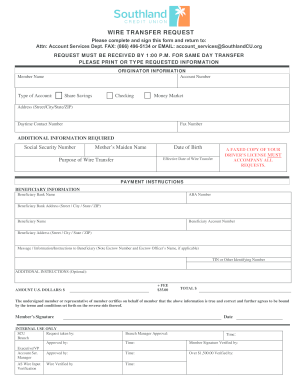
Filling out the Southland Credit Union Wire Transfer Request requires careful attention to detail to ensure your transfer is processed smoothly. This guide will walk you through each section of the form and provide clear instructions to help you complete it effectively.
Follow the steps to successfully complete your wire transfer request.
- Click ‘Get Form’ button to obtain the form and open it in your preferred digital document editor.
- Enter your originator information by providing your account number, full name as the member, and type of account. Specify whether it is a Share Savings, Checking, or Money Market account.
- Fill in your address details, including street, city, state, and ZIP code. Also, provide your daytime contact number and fax number.
- Input the additional information required, such as your Social Security number, mother's maiden name, date of birth, effective date for the wire transfer, and the purpose of the wire transfer.
- Ensure you have a faxed copy of your driver's license ready, as this must accompany your request.
- Proceed to the payment instructions section where you will enter the beneficiary information. This includes beneficiary bank name, ABA number, and the bank’s address.
- Provide beneficiary details, including the beneficiary's name, account number, address, and any message or instructions relevant to the transfer.
- Indicate the amount to be transferred in U.S. dollars along with the fee, which is typically $35.00.
- Finally, review all the information for accuracy, then sign the form to certify that the provided details are true and correct.
Complete your document online today to ensure timely processing of your wire transfer.