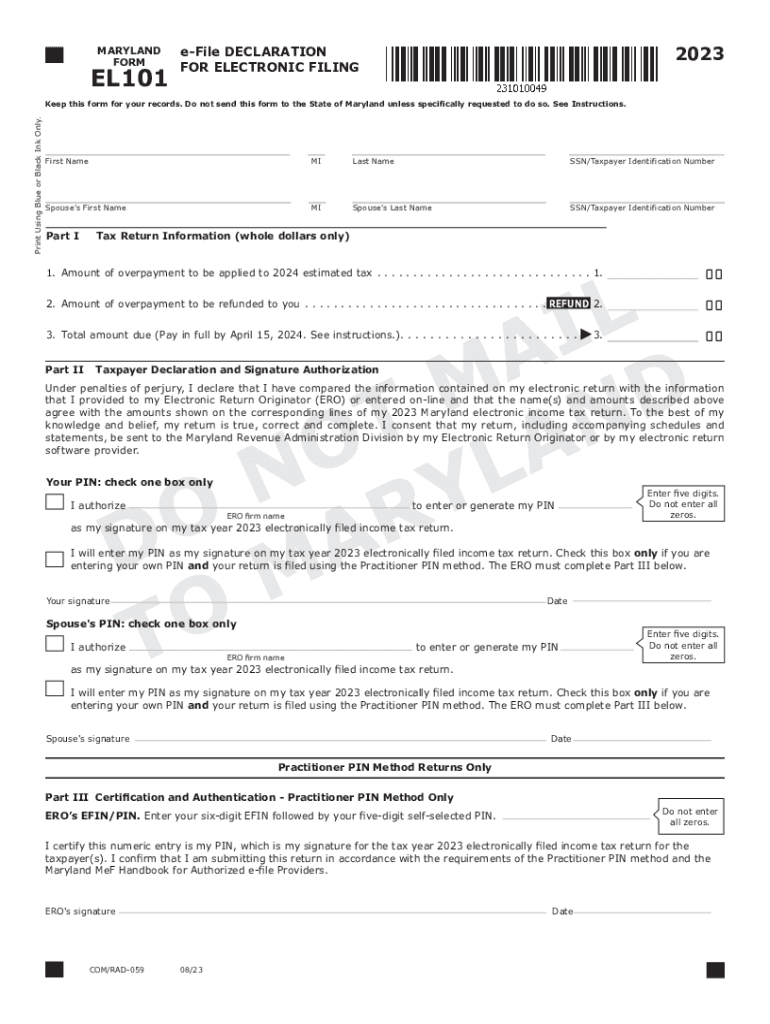
MARYLAND FORMEL1012023eFile DECLARATION FOR ELECTRONIC FILINGPrint Using Blue or Black Ink Only.Keep this form for your records. Do not send this form to the State of Maryland unless specifically.
Loading

Open form follow the instructions

Easily sign the form with your finger

Send filled & signed form or save
How to fill out the MD EL101 online
The MD EL101, also known as the e-File declaration for electronic filing, is an important document for taxpayers submitting their electronic returns. This guide provides a comprehensive walkthrough of how to accurately complete this form online, ensuring compliance and efficiency in your filing process.
Follow the steps to successfully complete the MD EL101 online.
- Press the ‘Get Form’ button to access the MD EL101 and open it in the editor.
- Fill out your personal information in the designated fields, including your first name, middle initial, last name, and taxpayer identification number.
- If applicable, enter your spouse's details in the respective fields, including their first name, middle initial, last name, and taxpayer identification number.
- Proceed to Part I of the form, providing the amounts of any overpayments that are to be applied to your 2024 estimated tax or refunded to you, ensuring all figures are in whole dollars.
- In Part II, declare and authorize your PIN. Choose whether you authorize your Electronic Return Originator (ERO) to enter or generate your PIN, or if you will do it yourself. Remember, your PIN must have five digits and cannot be all zeros.
- Sign and date the form in the designated areas, ensuring your signature is handwritten, or use an acceptable method such as a rubber stamp or digital mechanism.
- If applicable, followed by your spouse, enter and authorize their PIN entry in a similar manner.
- For practitioner PIN method returns, complete Part III with the ERO’s Electronic Filing Identification Number (EFIN) and their self-selected PIN.
- Review the entire form to ensure all information is accurate before saving your changes.
- Once completed, you can download, print, or share the edited form as required.
Complete your MD EL101 online today to ensure a smooth filing process.
Experience a faster way to fill out and sign forms on the web. Access the most extensive library of templates available.
Related content
Enter the name(s) and Social Security number(s) of the taxpayer(s) at the top of the form...
133, EL101-107. Links to Researchers. Goupell, Matthew. Department of Hearing ... 7251...
... MD 3000 MO MO 4000 MO MO 1040 1.(4. Fig.3 Naim Prefix, spectrum of 50Hz ... 2022. $100...
Get answers to your most pressing questions about US Legal Forms API.
Can Maryland trust return be filed electronically?
Fiduciary Filing Information Fiduciary tax returns can be filed electronically.
What address do I send my Maryland taxes to?
If you are sending a Form 502 or Form 505 (with a payment) through the US Postal Service, send it to: Comptroller of Maryland, Payment Processing, PO Box 8888, Annapolis, MD 21401-8888.
What is Maryland Form EL101?
Form EL101 is the declaration document and signature. authorization for an electronically filed return by an Electronic. Return Originator (ERO).
Can Maryland amended returns be filed electronically?
An amended Maryland return satisfies this requirement. An amended tax return cannot be filed electronically; you need to complete and mail a Form 1040X for your federal return and a Form MD 502X for your Maryland return.
Can amended returns be sent electronically?
Can I file my amended return electronically? (updated January 5, 2024) Yes. If you need to amend your Form 1040, 1040-SR, 1040-NR, or 1040-SS/PR for the current or two prior tax periods, you can amend these forms electronically using available tax software products.
Do I need to file a Maryland nonresident tax return?
You will need to file a nonresident income tax return to Maryland, using Form 505 and Form 505NR if you have income derived from: tangible property, real or personal, permanently located in Maryland; a business, trade, profession or occupation carried on in Maryland; or, gambling winnings derived from Maryland sources.
Can MD amended returns be filed electronically?
Forms 502X, 505X, and 505NR are Forms used for the Tax Amendment. Current and previous tax year: You can NOT prepare a Maryland Tax Amendment on eFile.com, however you must mail in the amendment as you can not e-File a Maryland tax amendment.
Is Maryland accepting eFile returns?
Yes. You can file Form 502 for free online using iFile or you can file electronically from your personal computer, using an online approved efile software vendor.
Use professional pre-built templates to fill in and sign documents online faster. Get access to thousands of forms.
If you believe that this page should be taken down, please follow our DMCA take down process here.