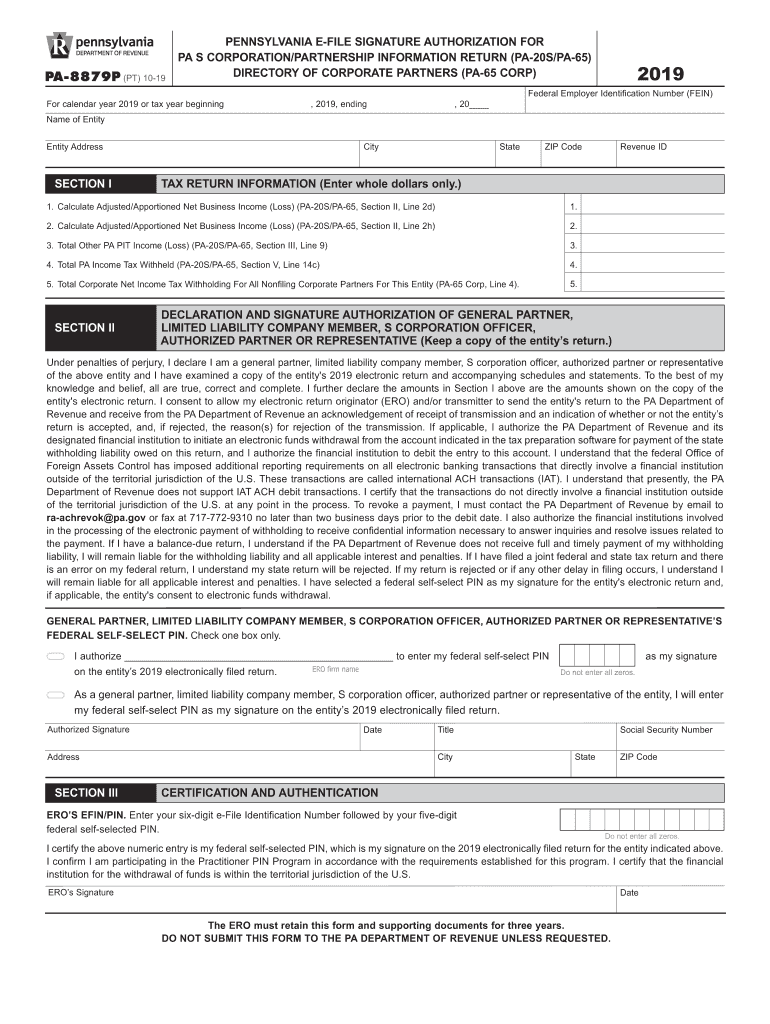
Dentification Number (FEIN) For calendar year 2019 or tax year beginning , 2019, ending , 20 Name of Entity Entity Address SECTION I City State ZIP Code TAX RETURN INFORMATION (Enter whole dollars only.) 1. Calculate Adjusted/Apportioned Net Business Income (Loss) (PA-20S/PA-65, Section II, Line 2d) 1. 2. Calculate Adjusted/Apportioned Net Business Income (Loss) (PA-20S/PA-65, Section II, Line 2h) 2. 3. Total Other PA PIT Income (Loss) (PA-20S/PA-65, Section III, Line 9) 3. 4.
Loading

Open form follow the instructions

Easily sign the form with your finger

Send filled & signed form or save
How to fill out the PA PA-8879P online
The PA PA-8879P is vital for general partners, limited liability company members, S corporation officers, and authorized representatives to electronically sign a Pennsylvania S Corporation or Partnership Information Return. This guide provides clear instructions for completing the form online, ensuring a smooth filing process.
Follow the steps to complete the PA PA-8879P online.
- Press the ‘Get Form’ button to access the PA PA-8879P and open it in your online editor.
- Fill in the calendar year and federal employer identification number (FEIN) in the designated fields at the top of the form.
- Enter the name of the entity and its complete address, including city, state, and ZIP code.
- In Section I, provide the tax return information based on the entity's 2019 tax return; enter whole dollars only.
- Complete the calculations for adjusted/apportioned net business income (loss) as specified for lines 1 and 2.
- Record any total other PA PIT income (loss) and the total PA income tax withheld, as indicated in the respective lines.
- In Section II, the authorized partner or representative must check the appropriate box to grant authorization for the electronic return originator (ERO) regarding the federal self-selected PIN.
- Enter the federal self-selected PIN in the designated area, ensuring it adheres to the format required by the PA Department of Revenue.
- Complete and sign the form with the title, date, and the address of the authorized partner or representative.
- In Section III, the ERO must enter their six-digit e-File identification number followed by a five-digit federal self-selected PIN.
- Once all sections are completed, the authorized partner must return the PA PA-8879P to the ERO through hand delivery, U.S. mail, or email.
- Finally, the ERO should retain the completed form for three years and ensure it is not submitted to the PA Department of Revenue unless requested.
Start completing your documents online today for a seamless filing experience.
Experience a faster way to fill out and sign forms on the web. Access the most extensive library of templates available.
Related content
DO NOT SUBMIT THIS FORM TO THE PA DEPARTMENT OF REVENUE UNLESS REQUESTED. PA-8879P (DR)...
Feb 6, 2023 — 2016 Personal Tax Forms · Instructions for PA-40 Personal Income Tax...
Under penalties of perjury, I declare that I have examined a copy of my electronic...
Get answers to your most pressing questions about US Legal Forms API.
What is an electronic return originator?
Definition. The Electronic Return Originator (ERO) is the Authorized IRS e-file Provider who originates the electronic submission of a return to the IRS. The ERO is usually the first point of contact for most taxpayers filing a return using IRS e-file.
Does Form 8879 replace 1040?
Form 8879 is used for Form 1040, U.S. Individual Income Tax Return; Form 8879-PE, IRS efile Signature Authorization for Form 1065; Form 8879-C, IRS efile Signature Authorization for Form 1120;and Form 8879-S, IRS efile Signature Authorization for Form 1120S.
When must an ERO obtain and retain completed form 8879 PE?
The ERO must retain Forms 8879 and 8878 for three years from the return due date or the IRS received date, whichever is later. EROs must not send Forms 8879 and 8878 to the IRS unless the IRS requests they do so. Once signed, an ERO must originate the electronic submission of a return as soon as possible. Signing an Electronic Tax Return iastate.edu https://.calt.iastate.edu › signing-electronic-tax-return iastate.edu https://.calt.iastate.edu › signing-electronic-tax-return
Is Form 1040 and 8879 the same?
What's New. Form 8879 is used to authorize the electronic filing (e-file) of original and amended returns. Use this Form 8879 (Rev. January 2021) to authorize e-file of your Form 1040, 1040-SR, 1040-NR, 1040-SS, or 1040- X, for tax years beginning with 2019. Form 8879 (Rev. January 2021) - IRS irs.gov https://.irs.gov › pub › irs-pdf irs.gov https://.irs.gov › pub › irs-pdf
What is form 8879 PE used for?
A partner or member or PR and an electronic return originator (ERO) use Form 8879-PE when the partner or member or PR wants to use a personal identification number (PIN) to electronically sign a partnership's electronic return of partnership income or AAR. Form 8879-PE - IRS irs.gov https://.irs.gov › pub › irs-access irs.gov https://.irs.gov › pub › irs-access
What is a form pa 8879?
Form 8879 is the declaration document and signature authorization for an e-filed return filed by an electronic return originator (ERO). About Form 8879, IRS e-file Signature Authorization IRS (.gov) https://.irs.gov › forms-pubs › about-form-8879 IRS (.gov) https://.irs.gov › forms-pubs › about-form-8879
What is Form 8453 PE used for?
Use this form to: Authenticate an electronic Form 1065, U.S. Return of Partnership Income; Authorize the ERO, if any, to transmit via a third-party transmitter; and. Authorize the intermediate service provider to transmit via a third-party transmitter if you are filing online.
Use professional pre-built templates to fill in and sign documents online faster. Get access to thousands of forms.
If you believe that this page should be taken down, please follow our DMCA take down process here.
This form is available in several versions. Select the version you need from the drop-down list below.