Loading
Get Transfer Authorization For Registered Investments - Hsbc Canada
How it works
-

Open form follow the instructions
-

Easily sign the form with your finger
-

Send filled & signed form or save
How to fill out the Transfer Authorization for Registered Investments - HSBC Canada online
This guide provides a clear and supportive approach to filling out the Transfer Authorization for Registered Investments form for HSBC Canada. Whether you are transferring from another institution or changing your investment accounts, this step-by-step process will help ensure your transfer is completed smoothly.
Follow the steps to complete your transfer authorization form
- Click ‘Get Form’ button to obtain the form and open it in the editor.
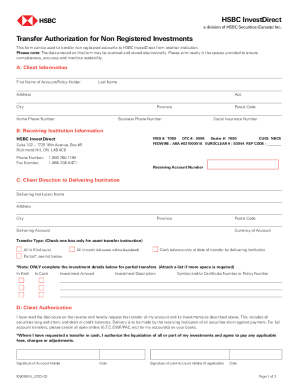
- Begin by filling in the 'Client Information' section. Enter your first name, last name, address, apartment number, city, province, home phone number, postal code, business phone number, and social insurance number clearly.
- Proceed to the 'Receiving Institution Information' section. Input HSBC InvestDirect's details, including the FINS, DTC, dealer number, CUID, and FEDWIRE information, ensuring accuracy.
- In the 'Client Direction to Delivering Institution' section, provide the delivering institution's name and address. Specify the receiving account number and the currency of the account.
- Choose the transfer type by checking one box only for your asset transfer instruction. Options include: 'All in Kind', 'All in cash', 'Cash balance only at date of transfer by delivering institution', or 'Partial'. Complete the investment details below if you select 'Partial'.
- If you selected a partial transfer, list each investment's amount, description, symbol, or certificate number and policy number as needed.
- Move to the 'Client Authorization' section. Read the disclosure on the reverse side carefully. Sign and date the form to authorize the transfer. If applicable, a joint account holder must also provide their signature and date.
- Finally, review all entered information for completeness and accuracy. Save changes, and then download, print, or share the completed form as needed.
Complete your transfer authorization form online today to ensure a smooth transition of your registered investments.
Go to hsbc.ca and log on to your account with your username and a security code generated using your HSBC Security Device. In the Quick links, select Pay and transfer. Choose an account to send money from. In the 'To' section, select Wire transfer.