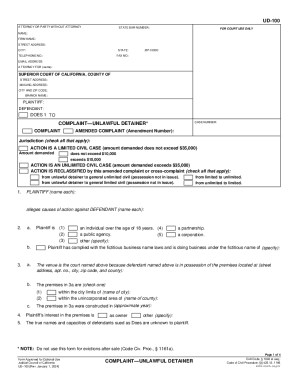
UD-100 ATTORNEY OR PARTY WITHOUT ATTORNEY STATE BAR NUMBER: FOR COURT USE ONLY NAME: FIRM NAME: STREET ADDRESS: CITY: STATE: TELEPHONE NO.: ZIP CODE: FAX NO.: EMAIL ADDRESS: ATTORNEY FOR (name): SUPERIOR.

How it works
  • Open form

    Open form follow the instructions

  • Easily sign form

    Easily sign the form with your finger

  • Share form

    Send filled & signed form or save

How to fill out the UD-100 Complaint—Unlawful Detainer online

Filling out the UD-100 Complaint—Unlawful Detainer form online is an essential step in the eviction process in California. This guide will provide you with a clear, step-by-step approach to accurately complete each section of the form, ensuring that your submission meets the necessary legal requirements.

Follow the steps to complete the UD-100 Complaint—Unlawful Detainer form online.

  1. Click ‘Get Form’ button to access the UD-100 form and open it in your editing tool.
  2. Enter your information as the attorney or party without an attorney at the top of the form. Include your name, firm name, street address, city, state, zip code, telephone number, fax number, and email address, as well as the name of the party you are representing, if applicable.
  3. Proceed to the section for the Superior Court details. Fill in the court's street address, mailing address, city, zip code, and branch name.
  4. List the names of the plaintiff and defendant in the designated fields, ensuring that you include the Case Number, if applicable.
  5. Indicate if you are filing a new complaint or an amended complaint and mark the jurisdiction type relevant to your case: limited civil case or unlimited civil case based on the amount demanded.
  6. Detail the plaintiff's claims against the defendant, specifying your compliance with fictitious business name laws, the address of the premises in question, and further relevant details such as the approximate year the premises were constructed.
  7. Populate the section regarding the rental agreement, including the date, payment terms, and any modifications made to the agreement.
  8. Complete the notice served to the defendant. Specify the type of notice served and the date, while documenting facts related to the service of the notice.
  9. State the specifics of your demands, including possession of the premises, past-due rent, and any additional claims for damages.
  10. Finally, verify all information is correct and sign the form. Check the confirmation that details any assistance received from an unlawful detainer assistant.
  11. After ensuring all sections are completed accurately, you can then save your changes, download, print, or share the completed form as needed.

Take action now by completing your UD-100 Complaint—Unlawful Detainer form online to move forward with your case.

Get form

Experience a faster way to fill out and sign forms on the web. Access the most extensive library of templates available.

Related content

Complaint—Unlawful Detainer (UD-100)

Complaint—Unlawful Detainer (UD-100) ... Starts an eviction case and tells the tenant...

Learn more
California Eviction

On June 22, 2016, Plaintiff filed an Unlawful Detainer Complaint against defendant seeking...

Learn more
UD-110 Judgment—Unlawful Detainer

Proc., § 1169). For possession only of the premises described on page 2 (item 4)...

Learn more
Questions & Answers

Get answers to your most pressing questions about US Legal Forms API.

Contact support

Can a tenant win an unlawful detainer California?

In California, there are dozens of affirmative defenses that could potentially be applied in an unlawful detainer to help a tenant win the case and avoid eviction.

Request/Counter-Request to Set Case for Trial—Unlawful Detainer (UD-150) Ask for a trial date in an eviction case when the tenant filed an Answer (form UD-105). Get form UD-150. Effective: January 1, 2005. View UD-150 Request/Counter-Request to Set Case for Trial—Unlawful Detainer form.

Tell the court and the landlord your responses to the Complaint and things you want to ask for as a tenant in an eviction case.

An unlawful detainer, also known as an eviction lawsuit, is a summary proceeding to determine the right to possession of real property. Moreover, the sole issue in an unlawful detainer action is possession of the premises, and no other issue may be tried without the consent of all parties.

Plaintiff's Mandatory Cover Sheet and Supplemental Allegations—Unlawful Detainer (UD-101) Tell the court required information about COVID-19-related issues as a landlord in an eviction case. You must file this with the court and deliver a copy to (serve) the tenant. Get form UD-101.

An Unlawful Detainer, more commonly known as an eviction, is used when a landlord wants to get tenants out of a rental property - either commercial or residential. Only a sheriff can evict someone. Even if a tenant is months behind on rent, the landlord cannot evict the tenant or get rid of the tenant's belongings.

Complaint—Unlawful Detainer (UD-100) Starts an eviction case and tells the tenant all the issues the landlord wants to include in a judgment against them. Get form UD-100. Effective: September 1, 2020.

If the landlord wins the case, they will get a "judgment" and the tenant has to move out. The Sheriff can enforce this judgment. This means the Sheriff can physically make the tenant leave. A landlord cannot evict a tenant without going through the proper steps.

Get This Form Now!

Use professional pre-built templates to fill in and sign documents online faster. Get access to thousands of forms.

If you believe that this page should be taken down, please follow our DMCA take down process here.

Get UD-100 Complaint—Unlawful Detainer