We use cookies to improve security, personalize the user experience, enhance our marketing activities (including cooperating with our marketing partners) and for other business use.
Click "here" to read our Cookie Policy. By clicking "Accept" you agree to the use of cookies. Read less
Read more
Accept
Loading
Form preview
  • US Legal Forms
  • Form Library
  • More Forms
  • More Multi-State Forms
  • 2000 Instructions For 2441. Child And Dependent Care Expenses

Get 2000 Instructions For 2441. Child And Dependent Care Expenses

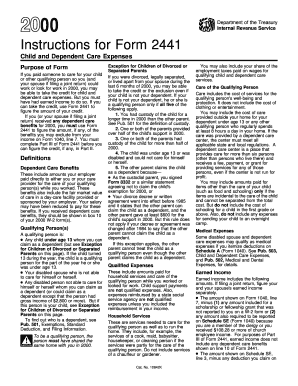
Ng person so you (and your spouse if filing a joint return) could work or look for work in 2000, you may be able to take the credit for child and dependent care expenses. But you must have had earned income to do so. If you can take the credit, use Form 2441 to figure the amount of your credit. If you (or your spouse if filing a joint return) received any dependent care benefits for 2000, you must use Form 2441 to figure the amount, if any, of the benefits you may exclude from your income on For.

How it works

  1. Open form

    Open form follow the instructions

  2. Easily sign form

    Easily sign the form with your finger

  3. Share form

    Send filled & signed form or save

How to fill out the 2000 Instructions For 2441. Child And Dependent Care Expenses online

This guide provides a detailed, user-friendly overview of completing the 2000 Instructions for Form 2441. Accurate completion of this form is essential for claiming eligible child and dependent care expenses, which can significantly benefit your tax situation.

Follow the steps to accurately complete the form online.

  1. Click 'Get Form' button to obtain the form and open it in your preferred editor.
  2. Review the purpose of the form: Ensure you understand that it is used to claim a credit for child and dependent care expenses incurred while you worked or sought work.
  3. Identify qualifying persons: Fill in the details of individuals who are considered qualifying persons, including children under age 13, a disabled spouse, or other dependents requiring care.
  4. Determine your earned income: Enter your earned income, ensuring you account for adjustments as applicable, and be mindful that dependent care benefits are not included in this figure.
  5. Enter qualified expenses: Document all expenses incurred for dependent care, making sure they comply with the definitions outlined in the form instructions.
  6. Complete provider information: For each caregiver, include their name, address, and social security number or employer identification number in the designated fields.
  7. Fill out qualifying person information: Provide names and social security numbers for qualifying persons, ensuring these match their official documentation.
  8. Make any necessary adjustments: Review the calculations to confirm the accuracy of your claimed credit and check for limits based on your income.
  9. Final review: Go through the completed form carefully, checking for errors or missing information that might delay processing.
  10. Save changes and submit: Once validated, save your completed form, and you can then proceed to download, print, or share it as needed.

Get started on your 2000 Instructions for Form 2441 and complete your documents online today.

Get form

Experience a faster way to fill out and sign forms on the web. Access the most extensive library of templates available.
Get form

Related content

Child and Dependent Care Expenses
... expenses in 2000, see the instructions for the amount to enter on line 44. 9. Form...
Learn more
2008 - Instructions for Form 2441
Child and Dependent Care Expenses part of the year he or she was under looked for work...
Learn more
2017 Publication 907
Feb 8, 2018 — To claim the exclusion, you must complete Part III of Form. 2441, Child...
Learn more

Related links form

DTC Transfer Agency Change Form - DTCC Dtc Blor Ibew 77 Hamtc Reimbursement Form - Tennessee Bar Association - Tba

Questions & Answers

Get answers to your most pressing questions about US Legal Forms API.

Contact support

Purpose of Form In addition, if you (or your spouse if filing jointly) received any dependent care benefits for 2023, you must use Form 2441 to figure the amount, if any, of the benefits you can exclude from your income. You must complete Part III of Form 2441 before you can figure the credit, if any, in Part II.

IRS Form 2441 is used to report child and dependent care expenses as part of your Federal income tax return. By reporting these expenses, you may be entitled to a tax credit of up to $3,000 for one qualifying person or $6,000 for two or more qualifying people.

The child and dependent care credit allows you to reduce the income tax you owe based on some of the expenses you incur for paying someone to provide care to your child or other dependent. But in order to take the credit, you must prepare Form 2441 with your tax return and satisfy some eligibility requirements.

Care you can claim To qualify for the child and dependent care credit, you must have paid someone, such as a daycare provider, to care for one or more of the following people: A child age 12 or younger at the end of the year whom you claim as a dependent on your tax return.

You must have earned income throughout the year to qualify. Any money earned from pensions, foreign earned income, Social Security benefits, workers' comp, unemployment, investment income from interest or dividends or child support does not count.

IRS Form 2441 is used to report child and dependent care expenses as part of your Federal income tax return. By reporting these expenses, you may be entitled to a tax credit of up to $3,000 for one qualifying person or $6,000 for two or more qualifying people.

Transportation that a care provider takes with your qualifying dependent (e.g., bus, subway, taxi). Dependent care center. Day camp. Fees, certain deposits and application fees paid to care providers or care services.

It's possible you can claim the child and dependent care credit if all of these are true: You pay someone to watch your children while you work. The person you paid doesn't qualify to be your dependent. The babysitter isn't your child if the child is younger than age 19.

Get This Form Now!

Use professional pre-built templates to fill in and sign documents online faster. Get access to thousands of forms.
Get form
If you believe that this page should be taken down, please follow our DMCA take down processhere.

Industry-leading security and compliance

US Legal Forms protects your data by complying with industry-specific security standards.
  • In businnes since 1997
    25+ years providing professional legal documents.
  • Accredited business
    Guarantees that a business meets BBB accreditation standards in the US and Canada.
  • Secured by Braintree
    Validated Level 1 PCI DSS compliant payment gateway that accepts most major credit and debit card brands from across the globe.
Get 2000 Instructions For 2441. Child And Dependent Care Expenses
Get form
Form Packages
Adoption
Bankruptcy
Contractors
Divorce
Home Sales
Employment
Identity Theft
Incorporation
Landlord Tenant
Living Trust
Name Change
Personal Planning
Small Business
Wills & Estates
Packages A-Z
Form Categories
Affidavits
Bankruptcy
Bill of Sale
Corporate - LLC
Divorce
Employment
Identity Theft
Internet Technology
Landlord Tenant
Living Wills
Name Change
Power of Attorney
Real Estate
Small Estates
Wills
All Forms
Forms A-Z
Form Library
Customer Service
Terms of Service
Privacy Notice
Legal Hub
Content Takedown Policy
Bug Bounty Program
About Us
Help Portal
Legal Resources
Blog
Affiliates
Contact Us
Delete My Account
Site Map
Industries
Forms in Spanish
Localized Forms
State-specific Forms
Forms Kit
Legal Guides
Real Estate Handbook
All Guides
Prepared for You
Notarize
Incorporation services
Our Customers
For Consumers
For Small Business
For Attorneys
Our Sites
US Legal Forms
USLegal
FormsPass
pdfFiller
signNow
airSlate WorkFlow
DocHub
Instapage
Social Media
Call us now toll free:
+1 833 426 79 33
As seen in:
  • USA Today logo picture
  • CBC News logo picture
  • LA Times logo picture
  • The Washington Post logo picture
  • AP logo picture
  • Forbes logo picture
© Copyright 1997-2025
airSlate Legal Forms, Inc.
3720 Flowood Dr, Flowood, Mississippi 39232
Form Packages
Adoption
Bankruptcy
Contractors
Divorce
Home Sales
Employment
Identity Theft
Incorporation
Landlord Tenant
Living Trust
Name Change
Personal Planning
Small Business
Wills & Estates
Packages A-Z
Form Categories
Affidavits
Bankruptcy
Bill of Sale
Corporate - LLC
Divorce
Employment
Identity Theft
Internet Technology
Landlord Tenant
Living Wills
Name Change
Power of Attorney
Real Estate
Small Estates
Wills
All Forms
Forms A-Z
Form Library
Customer Service
Terms of Service
Privacy Notice
Legal Hub
Content Takedown Policy
Bug Bounty Program
About Us
Help Portal
Legal Resources
Blog
Affiliates
Contact Us
Delete My Account
Site Map
Industries
Forms in Spanish
Localized Forms
State-specific Forms
Forms Kit
Legal Guides
Real Estate Handbook
All Guides
Prepared for You
Notarize
Incorporation services
Our Customers
For Consumers
For Small Business
For Attorneys
Our Sites
US Legal Forms
USLegal
FormsPass
pdfFiller
signNow
airSlate WorkFlow
DocHub
Instapage
Social Media
Call us now toll free:
+1 833 426 79 33
As seen in:
  • USA Today logo picture
  • CBC News logo picture
  • LA Times logo picture
  • The Washington Post logo picture
  • AP logo picture
  • Forbes logo picture
© Copyright 1997-2025
airSlate Legal Forms, Inc.
3720 Flowood Dr, Flowood, Mississippi 39232