Loading
Get What Version Of Form 56 Currenty In Use Rev 2011 Or Rev 1997
How it works
-

Open form follow the instructions
-

Easily sign the form with your finger
-

Send filled & signed form or save
How to fill out the What Version Of Form 56 Currently In Use Rev 2011 Or Rev 1997 online
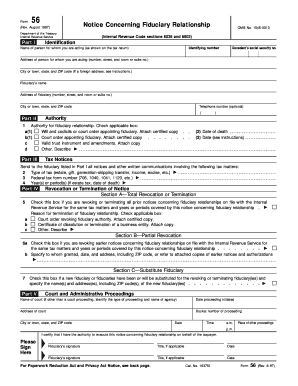
Form 56 serves as an important notification to the Internal Revenue Service regarding the creation or termination of a fiduciary relationship. This guide will provide you with step-by-step instructions on how to accurately fill out this form online.
Follow the steps to complete and submit your form online.
- Click ‘Get Form’ button to obtain the form and open it in the editor.
- Begin by filling out Part I, which requires the identification information of the person for whom you are acting. Enter their name, identifying number, and address as applicable. Make sure to include the decedent's social security number if you are acting on their behalf.
- In Part II, indicate your authority as a fiduciary by checking the appropriate box based on the situation (will, court order, etc.) and providing the required dates.
- Proceed to Part III to specify the types of tax matters associated with the fiduciary relationship. Enter the type of tax, federal tax form number, and relevant years or periods.
- If you need to revoke or terminate a prior notice, complete Part IV by selecting the appropriate checkboxes for total or partial revocation, and explaining the reason for termination.
- In Part V, complete the information regarding court and administrative proceedings, including the name of the court, the date the proceeding was initiated, and the docket number.
- Finally, make sure to sign the form in the designated area, indicating your title if applicable, then review all entries for accuracy.
- After completing the form, save your changes, and proceed to download, print, or share the completed Form 56.
Start filling out your Form 56 online today for timely submission and compliance.
Use Form 56-F to notify the IRS of a fiduciary relationship only if that relationship is with respect to a financial institution (such as a bank or a thrift).
Industry-leading security and compliance
US Legal Forms protects your data by complying with industry-specific security standards.
-
In businnes since 199725+ years providing professional legal documents.
-
Accredited businessGuarantees that a business meets BBB accreditation standards in the US and Canada.
-
Secured by BraintreeValidated Level 1 PCI DSS compliant payment gateway that accepts most major credit and debit card brands from across the globe.