Loading
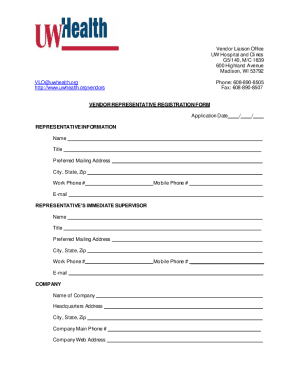
Get Vendor Representative Registration Form
How it works
-

Open form follow the instructions
-

Easily sign the form with your finger
-

Send filled & signed form or save
How to fill out the Vendor Representative Registration Form online
Completing the Vendor Representative Registration Form can be straightforward when approached step by step. This guide will assist you in accurately filling out the form online, ensuring all necessary information is provided for successful registration.
Follow the steps to successfully fill out the Vendor Representative Registration Form.
- Click ‘Get Form’ button to obtain the form and open it in the editor.
- Enter the application date in the designated field, ensuring you use the correct format for clarity.
- In the representative information section, fill in your name, title, preferred mailing address, city, state, zip code, work phone number, mobile phone number, and email. Make sure all contact information is accurate.
- Provide information about your immediate supervisor, including their name, title, preferred mailing address, city, state, zip code, work phone number, and email.
- Complete the company section by entering the name of your company, headquarters address, city, state, zip code, main phone number, company website address, and mobile phone number.
- List the products you represent in the appropriate field.
- Indicate whether you request patient area privileges by selecting 'Yes' or 'No.' If 'Yes,' briefly explain your request in the provided space.
- Enter the date completed for UW Health Safety and Infection Control training and attach the certificate as required.
- Provide the verification dates for the Criminal Background Check and Caregiver Background Check.
- Fill out the health documentation for tuberculosis status, influenza vaccine, hepatitis B, measles, mumps, and rubella, chickenpox (varicella), and COVID-19 vaccination, including dates and any necessary attachments.
- If you request scrubs, indicate 'Yes' or 'No,' provide your requested size, and location, explaining your need for scrubs in the space provided.
- Ensure you read and understand the notice regarding the registration fee and clarify if any exemptions apply to your situation.
- Once all sections are completed, review the form for accuracy, and save your changes. You may also download, print, or share the completed form as necessary.
Begin your registration process today by completing the Vendor Representative Registration Form online.
Related links form
ANNEX A - Technical Specifications Item List With ... - UNHCR - Unhcr
Terms And Conditions Of Purchase Order (tc 9998) No ... - Bombardier
CONFERENCE REGISTRATION FORM Click Here To Download The Zipped (MS Word Form) File (51Kb) UNHCR
Terms Of Reference UNHCR HQ Data Centre Colocation Service - Unhcr
A vendor is a person or company that sells goods or services for a profit. They can operate in a business-to-consumer (B2C) or business-to-business (B2B) environment. In B2B, vendors are often known as suppliers.