Loading
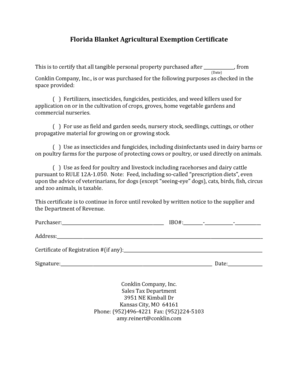
Get Florida Blanket Agricultural Exemption Certificate - Conklin
How it works
-

Open form follow the instructions
-

Easily sign the form with your finger
-

Send filled & signed form or save
How to fill out the Florida Blanket Agricultural Exemption Certificate - Conklin online
The Florida Blanket Agricultural Exemption Certificate - Conklin is an essential document used to certify the tax-exempt status of certain agricultural purchases. This guide provides clear, step-by-step instructions for filling out this form online, ensuring a smooth and efficient process.
Follow the steps to complete the form accurately.
- Click ‘Get Form’ button to access the Florida Blanket Agricultural Exemption Certificate - Conklin. This action opens the form in your preferred online editor.
- In the first section, enter the date after which all tangible personal property was purchased. Ensure this date is accurate to avoid any issues with tax exemption status.
- In the checkboxes provided, select all applicable purposes for which the items were purchased. Review each option carefully: fertilizers, seeds, insecticides, or feed for livestock.
- Fill in the purchaser's information, including the name, IBO number, and address. This information should be complete and up to date, as it identifies the user of the certification.
- If there is a Certificate of Registration number, include it in the designated field. This step is essential for record-keeping purposes and may be necessary for your supplier.
- Finally, sign the form to certify that the information provided is accurate, and include the date of signing. This signature is necessary to validate the exemption certificate.
- Once you have completed all sections, you can save your changes, download, print, or share the form as needed. Ensure that the form is submitted to the appropriate supplier and the Department of Revenue.
Complete your Florida Blanket Agricultural Exemption Certificate online today for a seamless experience.