Loading
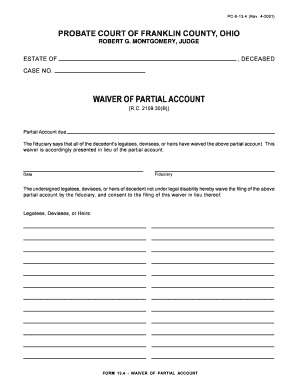
Get Web Pc-e-13.4 (rev. 4-2001). Web Pc-e-13.4 (rev. 4-2001)
How it works
-

Open form follow the instructions
-

Easily sign the form with your finger
-

Send filled & signed form or save
How to fill out the Web PC-E-13.4 (Rev. 4-2001) online
Filling out the Web PC-E-13.4 (Rev. 4-2001) online is a straightforward process that assists fiduciaries in waiving a partial account. This guide provides step-by-step instructions to help users complete the form accurately and efficiently.
Follow the steps to fill out the Web PC-E-13.4 (Rev. 4-2001) online.
- Click ‘Get Form’ button to obtain the form and open it in the interface.
- Enter the name of the deceased in the designated field, ensuring that it matches official records.
- Provide the case number associated with the estate in the specified field.
- Indicate the date of the waiver in the corresponding section, ensuring it accurately reflects the current date.
- Fill in your name as the fiduciary in the provided field, confirming your role in the estate management.
- Each legatee, devisee, or heir should sign their name in the prescribed area, confirming their consent to waive the partial account.
- Once you have completed all fields, review the information for accuracy and completeness.
- After verifying the information, you can save changes, download, print, or share the completed form as needed.
Begin completing your Web PC-E-13.4 (Rev. 4-2001) online now to ensure a smooth waiver process.
Industry-leading security and compliance
US Legal Forms protects your data by complying with industry-specific security standards.
-
In businnes since 199725+ years providing professional legal documents.
-
Accredited businessGuarantees that a business meets BBB accreditation standards in the US and Canada.
-
Secured by BraintreeValidated Level 1 PCI DSS compliant payment gateway that accepts most major credit and debit card brands from across the globe.