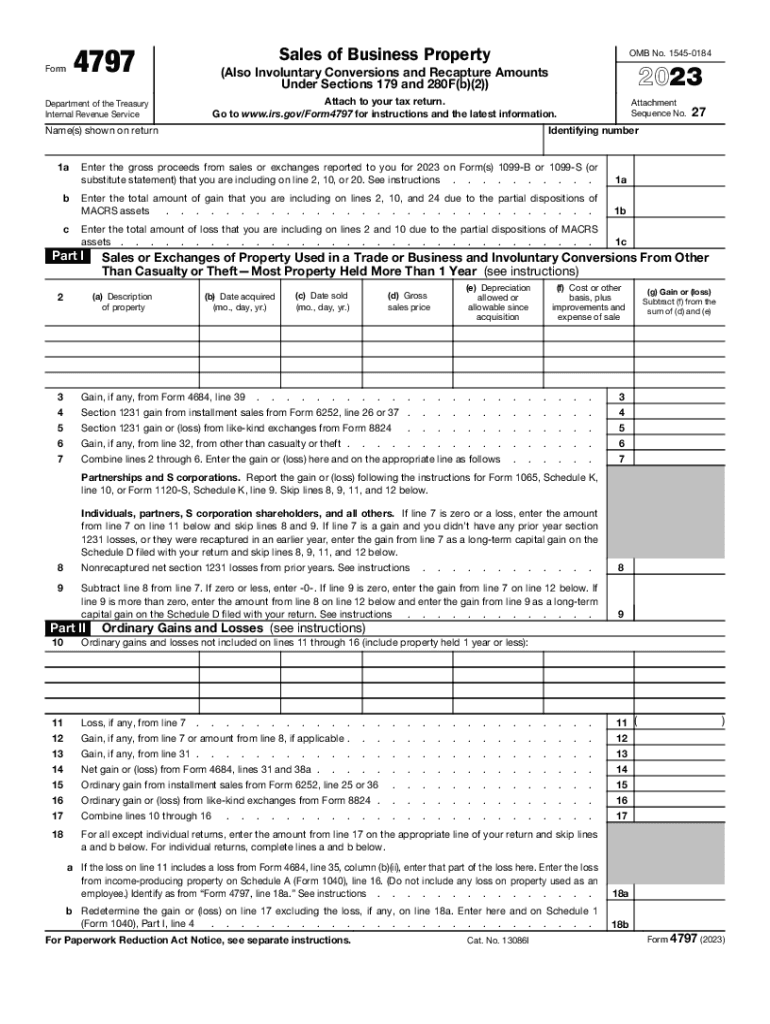
4797FormSales of Business PropertyOMB No. 154501842023(Also Involuntary Conversions and Recapture Amounts Under Sections 179 and 280F(b)(2)) Attach to your tax return. Go to www.irs.gov/Form4797 for.
Loading

Open form follow the instructions

Easily sign the form with your finger

Send filled & signed form or save
How to fill out the IRS 4797 online
Filling out the IRS Form 4797 is an essential step for reporting the sale of business property and certain involuntary conversions. This guide will provide clear instructions on how to complete the form online, ensuring that users can navigate each section confidently.
Follow the steps to fill out the IRS 4797 online effectively.
- Click ‘Get Form’ button to obtain the form and open it in the editor.
- In Section 1, enter the gross proceeds from sales or exchanges reported to you on Form(s) 1099-B or 1099-S. This information is crucial for accurate reporting.
- Continue by entering the total amount of gain from partial dispositions of MACRS assets in line 1b and the total amount of loss in line 1c.
- In Part I, provide details about the property sold, including the description, acquisition date, sale date, depreciation allowed or allowable since acquisition, gross sales price, and cost basis plus improvements and expenses.
- Calculate the gain or loss for each property sold and report this in lines 3 to 7. Refer to the relevant forms as needed for specific calculations.
- Proceed to Part II for ordinary gains and losses. Report any ordinary gain or loss, ensuring that you include all necessary information from previous lines.
- In Part III, report gains from dispositions of property under specific sections. Make sure to provide deep details on gained properties and follow the instructions for accurately computing recapture amounts and depreciation.
- For Part IV, enter the section 179 and section 280F(b)(2) recapture amounts, if applicable, and ensure to report these correctly according to IRS guidelines.
- Once you have filled in all necessary information, review your entries for accuracy, then save changes. You can download, print, or share the completed form as needed.
Start filling out your IRS Form 4797 online today to ensure timely and accurate reporting.
Experience a faster way to fill out and sign forms on the web. Access the most extensive library of templates available.
Related content
1a Enter the gross proceeds from sales or exchanges reported to you for 2023 on Form(s)...
▷ Attach to your tax return. ▷ Information about Form 4797 and its separate...
In 2014, the IRS issued Notice 2014-21, 2014-16 I.R.B. 938, explaining that virtual...
Get answers to your most pressing questions about US Legal Forms API.
What is the difference between form 4797 and form 8949?
It's important to note that Form 4797 is used primarily for business property sales. For personal property transactions, such as the sale of a personal residence, a different form, such as Form 8949 or Schedule D, may be used.
Where does land sale get reported on 4797?
The disposition of each type of property is reported separately in the appropriate part of Form 4797 Sales of Business Property (for example, for property held more than one year, report the sale of a building in Part III and land in Part I).
What is form 8949 used for?
Use Form 8949 to report sales and exchanges of capital assets. Form 8949 allows you and the IRS to reconcile amounts that were reported to you and the IRS on Forms 1099-B or 1099-S (or substitute statements) with the amounts you report on your return.
What is the 4797 form used for?
Key Takeaways. Form 4797 is a tax form distributed by the Internal Revenue Service (IRS). Form 4797 is used to report gains made from the sale or exchange of business property, including property used to generate rental income, and property used for industrial, agricultural, or extractive resources.
Do I need form 8949 and 4797?
Use 8949 for regular transactions and 4797 for properties with special considerations. Grasping the distinctions is crucial for accuracy, especially for the California tax on sale of a rental property.
Is form 4797 a Schedule D?
IRS Form 4797 has much more specific utilization, while Schedule D is a required form for anyone reporting personal gains in general. So when filling out Schedule D, you'll be automatically referred to Form 4797 if you are reporting gains from the sale of business property.
What is IRS form 4797 used for?
Use Form 4797 to report: The sale or exchange of property. The involuntary conversion of property and capital assets. The disposition of noncapital assets.
When not to use form 8949?
Anyone who has received one or more Forms 1099-B, Forms 1099-S, or IRS-allowed substitutions should file a Form 8949. You may not need to file Form 8949 if the basis for all of your transactions was reported to the IRS, and if you don't need to make any adjustments to those figures.
Use professional pre-built templates to fill in and sign documents online faster. Get access to thousands of forms.
If you believe that this page should be taken down, please follow our DMCA take down process here.