Loading
Get Bmv: Title Forms
How it works
-

Open form follow the instructions
-

Easily sign the form with your finger
-

Send filled & signed form or save
How to fill out the BMV: Title Forms online
Filling out the BMV: Title Forms online can streamline the process of obtaining a vehicle title in Indiana. This guide provides clear, step-by-step instructions to help users navigate each section of the form with ease.
Follow the steps to successfully complete the online title form.
- Click ‘Get Form’ button to access the title form and open it in the designated editor.
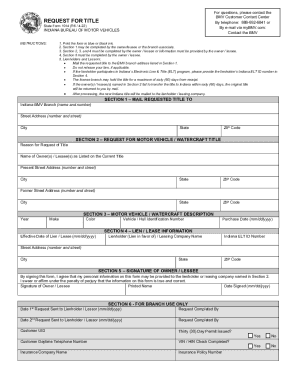
- In Section 1, provide the street address, city, state, and ZIP code where you would like the requested title mailed. Specify the reason for the title request.
- In Section 2, enter the names of the owner(s) or lessee(s) exactly as listed on the current title. Add the present street address, city, state, and ZIP code. If the owner or lessee has had a former address, include that as well.
- Proceed to Section 3 to describe the motor vehicle or watercraft. Fill in the year, make, color, effective date of lien or lease, and the vehicle or hull identification number.
- In Section 4, provide the name of the lienholder or leasing company, purchase date, and if applicable, their Indiana ELT ID number. Include the lienholder's address, city, state, and ZIP code.
- Section 5 requires the signature of the owner or lessee. By signing, you affirm that the information provided is true and that personal information may be shared with the lienholder or leasing company. Print your name and the date signed.
- After completing all sections, review the form for accuracy. Save your changes, and then download, print, or share the completed form as needed.
Complete your documents online today for a hassle-free experience.
There are several options available to order a duplicate title. If no information about your name, the vehicle, or a lien has changed, you may order a duplicate title online through your myBMV account (https://mybmv.bmv.in.gov/bmv/mybmv/default.aspx), at a BMV Connect Kiosk, or at a BMV branch.