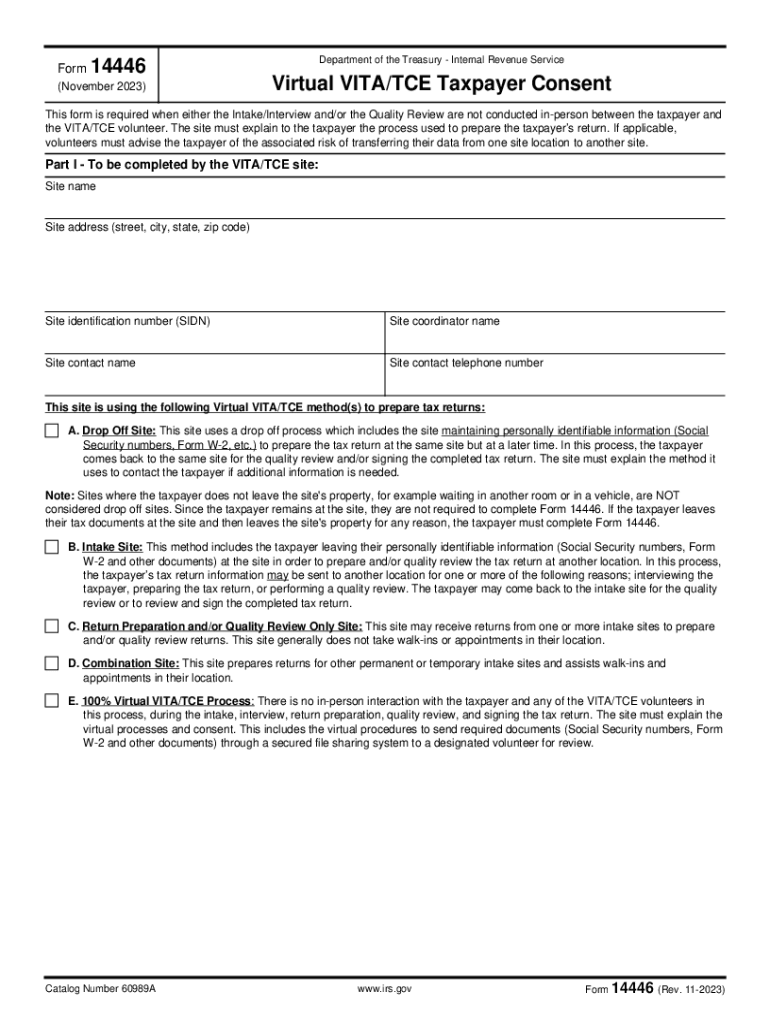
Form14446(November 2023)Department of the Treasury Internal Revenue ServiceVirtual VITA/TCE Taxpayer ConsentThis form is required when either the Intake/Interview and/or the Quality Review are not.
Loading

Open form follow the instructions

Easily sign the form with your finger

Send filled & signed form or save
How to use or fill out the Irs Form 15272 - Fill Out And Sign Printable PDF Template online
Filling out the Irs Form 15272 is an essential step for taxpayers utilizing the Virtual VITA/TCE services. This guide provides clear, step-by-step instructions to help users navigate the form easily and efficiently.
Follow the steps to complete the form online.
- Click the ‘Get Form’ button to access the form and open it in your chosen editor.
- Begin with Part I of the form. Fill in your site name, site address, and site identification number. This information identifies where the service is being provided.
- Continue in Part I by entering the name of the site coordinator, contact name, and their telephone number. This ensures users have clear points of contact.
- Select the appropriate Virtual VITA/TCE method(s) used at the site by circling the correct option. Provide a detailed explanation of how taxpayers' information will be handled under that method in Part II.
- Move to Part II, where you need to describe the processes for scheduling appointments and securing taxpayer consent agreements. Clearly outline how documents will be managed.
- Proceed to detail how taxpayer authentication will be validated, including which documents will be reviewed and the communication channels used.
- Document the procedure for conducting interviews and preparing tax returns, noting where and how the preparation occurs.
- Explain methods of communication with the taxpayer regarding any additional information needs, as well as how quality reviews will be conducted.
- Clarify how the completed return will be shared with the taxpayer and the signing process, indicating whether it will be done in-person or electronically.
- Lastly, review all entered information for accuracy. Once you are satisfied, you can save changes, download, or print the completed form.
Begin filling out your Irs Form 15272 online to ensure a smooth tax return process.
Experience a faster way to fill out and sign forms on the web. Access the most extensive library of templates available.
Related content
Complete and sign Form 13533, VITA/TCE Partner Sponsor Agreement. • Select or...
Aug 24, 1999 — ... fill in the “Totals” column on only one Schedule E. The figures...
Sep 25, 2023 — Use this form when completing the tax returns and answering the test...
Get answers to your most pressing questions about US Legal Forms API.
What is form 15272?
IRS form 15272 is meant for checking software and hardware used for VITA/TCE activity.
What is pub 5683?
The purpose of Publication 5683, VITA/TCE Handbook for Partners and Site Coordinators, is to inform you of your obligations and expectations as a partner or coordinator and help you effectively administer and operate your VITA/TCE tax preparation site.
What is the role of a Vita site coordinator?
Serve the community by educating and helping taxpayers who need the benefit of Volunteer Income Tax Assistance (VITA) services. Site Coordinators are expected to provide effective site management for their volunteers and are responsible for managing, organizing, and supervising all aspects of VITA site operations.
What is IRS Form 15272?
VITA/TCE Security Plan All VITA/TCE sites, except Facilitated Self Assistance (FSA) remote sites, must prepare an annual security plan to safeguard taxpayer data. Sites can use Form 15272, VITA/TCE Security Plan or a similar document which captures the same information to meet this requirement.
Which IRS publication includes roles and responsibilities of the site coordinator?
Publication 5683, VITA/TCE Handbook for Partners and Site CoordinatorsPDF, is the primary source of information for VITA/TCE program coordination and site management. Whether you are a returning site coordinator or brand new, the part you play is critical to the success of the Volunteer Income Tax Assistance program.
When partner owned computers or IRS loaned computers or printers are lost or stolen?
Partners agree to immediately notify the IRS of IRS-loaned equipment (computers and printers) that is stolen or lost, but not later than the next business day, after confirmation of the incident. Partners should provide all readily available information to their local SPEC territory office.
Use professional pre-built templates to fill in and sign documents online faster. Get access to thousands of forms.
If you believe that this page should be taken down, please follow our DMCA take down process here.