Loading
Get Fillable D 40
How it works
-

Open form follow the instructions
-

Easily sign the form with your finger
-

Send filled & signed form or save
How to fill out the Fillable D 40 online
This guide provides a comprehensive walkthrough for users looking to complete the Fillable D 40 form online. Whether you are filing as a single, married, or a registered domestic partner, the following steps will help you navigate each section of the form with ease.
Follow the steps to complete the Fillable D 40 form online
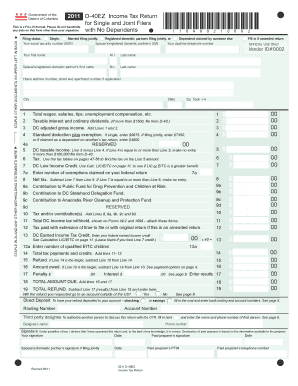
- Click the ‘Get Form’ button to access the Fillable D 40 form and open it in your preferred editor.
- Begin by selecting your filing status from the available options: Single, Married filing jointly, Registered domestic partners filing jointly, or Dependent claimed by someone else. Provide the required social security numbers (SSN) for you and your spouse or partner, along with your daytime telephone number.
- Fill in your first name, middle initial (M.I.), and last name in the appropriate sections, followed by the corresponding information for your spouse or registered domestic partner.
- Enter your home address, including the number, street, apartment number (if applicable), city, state, and ZIP code with the last four digits.
- Report your total wages, salaries, tips, unemployment compensation, and any additional income in the designated fields. Ensure you also complete the lines for taxable interest and ordinary dividends, based on your situation.
- Calculate your DC adjusted gross income by adding the amounts from specified lines and fill in the result accordingly.
- Deduct the standard deduction or exemption based on your filing status. This amount will differ for single filers, joint filers, or dependents.
- Use the tax tables referenced in the form to determine the appropriate tax amount based on your DC taxable income.
- Provide information on any distributions or contributions to specified funds and report your tax withholding amounts accurately by attaching Forms W-2 and 1099.
- Complete any remaining sections regarding credits, total tax payments, and potential refunds or amounts owed, following the prompts carefully.
- Once all fields are filled out accurately, review the document for completeness and correctness. You can then save your changes, download the completed form, print it for your records, or share it as needed.
Start filling out your documents online to ensure a smooth and efficient filing process.
If you are a bona fide resident of Guam for the entire tax year, then you must file a tax return with Guam reporting gross income from worldwide sources. If you are also a U.S. citizen or resident alien, you must file a U.S. Tax Return reporting your worldwide income, with the exception of income from Guam.