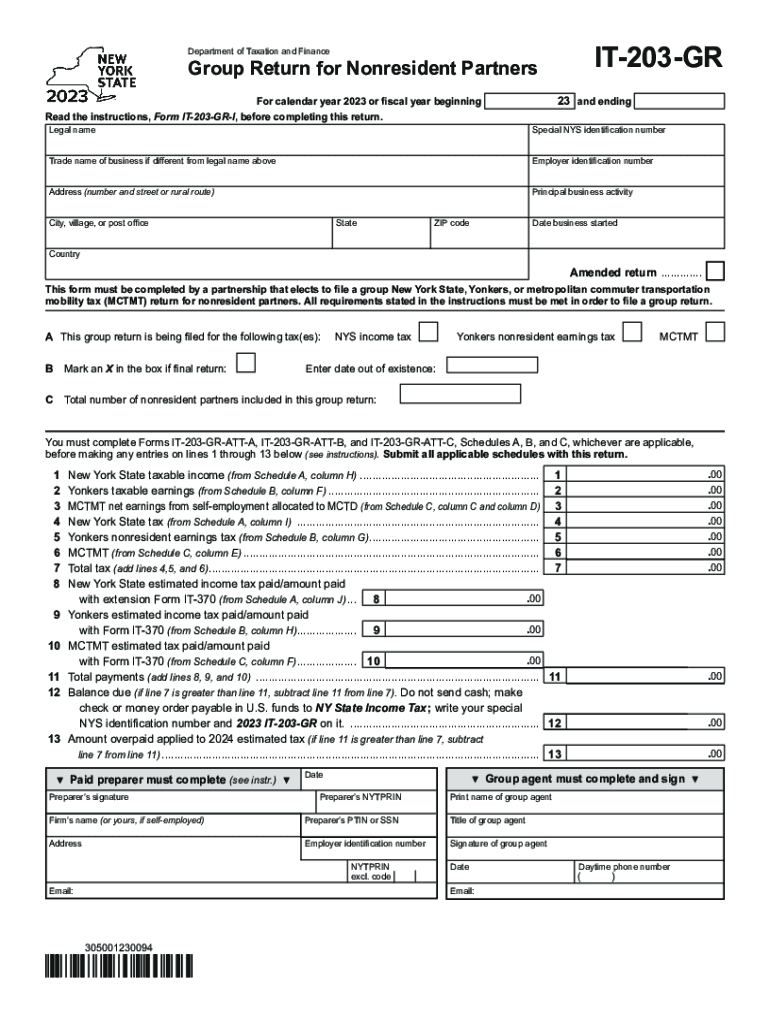
IT203GRDepartment of Taxation and FinanceGroup Return for Nonresident Partners23and endingFor calendar year 2023 or fiscal year beginningRead the instructions, Form IT203GRI, before completing this.
Loading

Open form follow the instructions

Easily sign the form with your finger

Send filled & signed form or save
How to fill out the NY IT-203-GR online
Filling out the NY IT-203-GR form is essential for partnerships that choose to file a group return for nonresident partners in New York State. This guide provides a clear, step-by-step approach to help users complete the form accurately and efficiently online.
Follow the steps to fill out the NY IT-203-GR form.
- Click the 'Get Form' button to access the form and open it in your preferred digital format.
- Begin by filling in the legal name of the partnership at the top of the form. Ensure that you provide any applicable special New York State identification number, trade name, and employer identification number.
- Complete the address section providing the number and street, city, state, ZIP code, and country where the partnership is located. Additionally, include the date the business started.
- Indicate if this is an amended return by marking the appropriate box. If applicable, enter the date out of existence for the partnership.
- In Section A, specify which tax types the group return is being filed for by marking the relevant boxes for New York State income tax, Yonkers nonresident earnings tax, and MCTMT.
- Complete lines 1 through 13 by entering amounts specified in the applicable schedules (Schedule A, B, and C). Start with the New York State taxable income and continue through to the total payments.
- After completing the lines, calculate if there is a balance due or an overpayment. This will help in determining if you need to make a payment or if there is a refund.
- If you have used a paid preparer, ensure that they fill in their section with the appropriate details.
- Lastly, review all entries for accuracy before saving changes. You can then download, print, or share the form as necessary.
Complete your NY IT-203-GR form online today to ensure timely and accurate filing!
Experience a faster way to fill out and sign forms on the web. Access the most extensive library of templates available.
Related content
This form must be completed by a partnership that elects to file a group New York State...
Mar 28, 2021 — Page 203. Major Requirements. Required Courses. Credits: MENG 601...
by D Dowell · 2022 · Cited by 428 — 203. Gomes T, Mamdani MM, Dhalla IA, Paterson JM...
Get answers to your most pressing questions about US Legal Forms API.
How do I respond to my NY tax notice online?
Log in to or create your Online Services account. Select the ≡ Services menu, then choose Respond to department notice. From the Questionnaire page, in the Notice type section, select My return was selected for review or audit, as shown in the image below.
What is exempt from NYC unincorporated business activity?
Who is Exempt from this Tax? Performing services as an employee is not subject to UBT. An owner, lessee, or fiduciary who is engaged in holding, leasing, or managing real property for their own account. Entities engaged primarily with qualifying investment activities are partially exempt from UBT on the income.
What is NY tax form 203?
New York Resident, Nonresident, and Part-Year Resident Itemized Deductions. Used by nonresident and part-year resident (Form IT-203) filers who need to report other New York State or New York City taxes, and tax credits other than those reported directly on Form IT-203.
Do I have to pay NYC taxes if I don't live in NYC?
All city residents' income, no matter where it is earned, is subject to New York City personal income tax. Nonresidents of New York City are not liable for New York City personal income tax. The rules regarding New York City domicile are also the same as for New York State domicile.
Who must file NYC corporate tax return?
Corporations that do business, employ capital, or own or lease property, or maintain an office in the city in a corporate or organized capacity must pay this tax.
Do I need to file a NYC tax return?
Generally, you must file a New York State income tax return if you are a New York State resident and are required to file a federal return. You may also have to file a New York State return if you are a nonresident of New York and you have income from New York State sources.
Do I have to file a NY nonresident return?
ing to Form IT-203-I, you must file a New York part-year or nonresident return if: You have any income from a New York source and your New York AGI exceeds your New York State standard deduction. You want to claim a refund for any New York State, New York City, or Yonkers taxes that were withheld from your pay.
Do I need to file a NYC 204?
Any partnership that carries on or liquidates any trade, business, profession or occupation wholly or partly within New York City and has a total gross income from all business regardless of where carried on of more than $25,000 (prior to any deduction for cost of goods sold or services performed) must file an ...
Use professional pre-built templates to fill in and sign documents online faster. Get access to thousands of forms.
If you believe that this page should be taken down, please follow our DMCA take down process here.