Loading
Form preview
  • US Legal Forms
  • Other Templates
  • More Forms
  • More Multi-State Forms
  • New York Form It-225 (new York State Modifications)

Get New York Form It-225 (new York State Modifications)

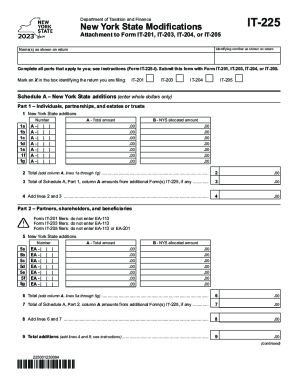
Department of Taxation and FinanceNew York State ModificationsAttachment to Form IT201, IT203, IT204, or IT205Name(s) as shown on returnIT225Identifying number as shown on returnComplete all parts.

How it works

  1. Open form

    Open form follow the instructions

  2. Easily sign form

    Easily sign the form with your finger

  3. Share form

    Send filled & signed form or save

How to fill out the New York Form IT-225 (New York State Modifications) online

New York Form IT-225 is an essential document for individuals, partnerships, and estates or trusts who need to report modifications to their New York State tax return. This guide provides you with clear, step-by-step instructions on how to complete the form online, ensuring a smooth filing process.

Follow the steps to complete the New York Form IT-225 online.

  1. Press the ‘Get Form’ button to access the form and open it in the online editor.
  2. Fill in your name(s) as they appear on your tax return in the designated field.
  3. Enter your identifying number as displayed on your tax return, ensuring accuracy.
  4. Identify the specific return you are filing by marking an X in the appropriate box for IT-201, IT-203, IT-204, or IT-205.
  5. Proceed to Schedule A, where you will report New York State additions. Enter whole dollar amounts in the provided fields (1a through 1g) for any applicable additions, marking total amounts clearly.
  6. Calculate the total for Schedule A, Part 1, and enter it in the designated line after summing up your entries from column A.
  7. If applicable, add any additional amounts from other Form(s) IT-225 to the total from Schedule A, Part 1, referencing line 3 to complete this section.
  8. Continue to Schedule B to report any New York State subtractions. Similar to Schedule A, fill out the fields (10a through 10g) for any deductions in whole dollar amounts.
  9. Sum the totals for Schedule B and follow the same process as in Schedule A to finalize your numbers.
  10. Review all entries for accuracy and completeness before finalizing your form.
  11. Once satisfied with your entries, save changes, and proceed to download, print, or share the form as needed.

Start filling out your New York Form IT-225 online today for a seamless tax filing experience!

Get form

Experience a faster way to fill out and sign forms on the web. Access the most extensive library of templates available.
Get form

Related content

Instructions for Form IT-225 New York State...
7 days ago — General information. To report any New York additions and subtractions to...
Learn more
Instructions for Form IT-214 - Tax.NY.gov
see the instructions for Form IT-201 and Form IT-225, New York State. Modifications, and...
Learn more
Form IT-203-I:2017:Instructions for From IT-203...
Form IT-225, New York State Modifications, and its instructions. Nonresidents. These New...
Learn more

Related links form

Indiana Swimming Change/transfer Form $1.00 Fee - TeamUnify Bronze Pelican Award Nom Form.doc FGF - Barre, Vermont Winifred Stary Scholarship Form

Questions & Answers

Get answers to your most pressing questions about US Legal Forms API.

Contact support

Beginning in 2022, the subtraction modification will be increased from 5% to 15%, and it will be available to: (a) sole proprietors with one or more employees and less than $250,000 of net business income or net farm income; (b) owners of New York S corporations and tax-partnerships with one or more employees and net ...

To report any New York additions and subtractions to federal adjusted gross income that do not have their own line on your return, complete Form IT-225 and submit it with your return.

The Tax Law exempts purchases for resale; most sales to or by the federal and New York State governments, charitable organizations, and certain other exempt organizations; sales of most food for home consumption; and sales of prescription and nonprescription medicines. Sales tax also does not apply to most services.

New York Addition: The Income which is not reported in Federal but taxable in the state return is New York State Additions. New York Subtraction: The Income which is reported in Federal but not taxable in the state return is New York State Subtractions.

Get This Form Now!

Use professional pre-built templates to fill in and sign documents online faster. Get access to thousands of forms.
Get form
If you believe that this page should be taken down, please follow our DMCA take down processhere.
Get New York Form IT-225 (New York State Modifications)
Get form
  • Adoption
  • Bankruptcy
  • Contractors
  • Divorce
  • Home Sales
  • Employment
  • Identity Theft
  • Incorporation
  • Landlord Tenant
  • Living Trust
  • Name Change
  • Personal Planning
  • Small Business
  • Wills & Estates
  • Packages A-Z
  • Affidavits
  • Bankruptcy
  • Bill of Sale
  • Corporate - LLC
  • Divorce
  • Employment
  • Identity Theft
  • Internet Technology
  • Landlord Tenant
  • Living Wills
  • Name Change
  • Power of Attorney
  • Real Estate
  • Small Estates
  • Wills
  • All Forms
  • Forms A-Z
  • Other Templates
  • Legal Hub
  • About Us
  • Help Portal
  • Legal Resources
  • Blog
  • Affiliates
  • Contact Us
  • Delete My Account
  • Site Map
  • Industries
  • Forms in Spanish
  • Localized Forms
  • State-specific Forms
  • Forms Kit
  • Real Estate Handbook
  • All Guides
  • Notarize
  • Incorporation services
  • For Consumers
  • For Small Business
  • For Attorneys
  • USLegal
  • FormsPass
  • pdfFiller
  • signNow
  • altaFlow
  • DocHub
  • Instapage
Form Packages
  • Adoption
  • Bankruptcy
  • Contractors
  • Divorce
  • Home Sales
  • Employment
  • Identity Theft
  • Incorporation
  • Landlord Tenant
  • Living Trust
  • Name Change
  • Personal Planning
  • Small Business
  • Wills & Estates
  • Packages A-Z
Form Categories
  • Affidavits
  • Bankruptcy
  • Bill of Sale
  • Corporate - LLC
  • Divorce
  • Employment
  • Identity Theft
  • Internet Technology
  • Landlord Tenant
  • Living Wills
  • Name Change
  • Power of Attorney
  • Real Estate
  • Small Estates
  • Wills
  • All Forms
  • Forms A-Z
  • Other Templates
Customer Service
  • Legal Hub
  • About Us
  • Help Portal
  • Legal Resources
  • Blog
  • Affiliates
  • Contact Us
  • Delete My Account
  • Site Map
  • Industries
  • Forms in Spanish
  • Localized Forms
  • State-specific Forms
  • Forms Kit
Legal Guides
  • Real Estate Handbook
  • All Guides
Prepared for you
  • Notarize
  • Incorporation services
Our Customers
  • For Consumers
  • For Small Business
  • For Attorneys
Our Sites
  • USLegal
  • FormsPass
  • pdfFiller
  • signNow
  • altaFlow
  • DocHub
  • Instapage
Social Media
Call us now toll free:
+1 833 426 79 33
As seen in:
© Copyright 1999-2026 airSlate Legal Forms, Inc. 17 Station Street, Ste. 203, Brookline, MA 02445
  • Your Privacy Choices
  • Terms of Service
  • Privacy Notice
  • Content Takedown Policy
  • Bug Bounty Program