Loading
Get 2010-2011 Adequate Yearly Progress (ayp) Appeals Process
How it works
-

Open form follow the instructions
-

Easily sign the form with your finger
-

Send filled & signed form or save
How to fill out the 2010-2011 Adequate Yearly Progress (AYP) Appeals Process online
This guide provides a clear and supportive walkthrough for users navigating the 2010-2011 Adequate Yearly Progress (AYP) Appeals Process. By following these steps, you will be able to accurately complete the appeals form online, ensuring that your concerns regarding AYP data are effectively communicated.
Follow the steps to complete your AYP appeals form online.
- Press the ‘Get Form’ button to obtain the appeals form and access it in the appropriate editing format.
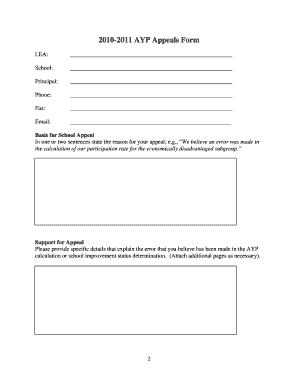
- Fill in the LEA field with the Local Education Agency's name. Ensure that this information is accurate to avoid any delays in processing your appeal.
- Provide the school's name in the designated field. This should correspond to the school the appeal is concerning.
- Enter the principal's name in the principal field. This identifies the individual responsible for the school.
- Complete the phone and fax fields with the school’s official contact information to facilitate communication.
- In the 'Basis for school appeal' section, concisely state the reason for your appeal. For instance, you can indicate any errors you believe were made regarding the calculation of participation rates.
- Utilize the 'Support for appeal' section to provide specific details that outline the perceived error. You may attach additional pages if required to fully express your concerns.
- Indicate how the approval of your appeal would impact the AYP status of the school or LEA. Check all applicable categories such as overall change to AYP status, impact on subgroup targets, or changes to improvement status.
- Select all relevant categories that apply to your appeal, including participation rates, reading, math, attendance, graduation, and subgroups.
- Once all sections have been completed, review your entries for accuracy, then save your changes. You can download, print, or share the form as needed.
Begin filling out your 2010-2011 AYP appeals form online today to ensure your concerns are addressed.
Industry-leading security and compliance
US Legal Forms protects your data by complying with industry-specific security standards.
-
In businnes since 199725+ years providing professional legal documents.
-
Accredited businessGuarantees that a business meets BBB accreditation standards in the US and Canada.
-
Secured by BraintreeValidated Level 1 PCI DSS compliant payment gateway that accepts most major credit and debit card brands from across the globe.