Loading
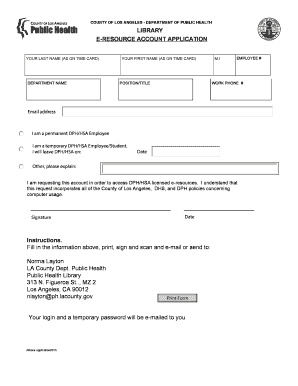
Get E-resource Account Application - Public Health
How it works
-

Open form follow the instructions
-

Easily sign the form with your finger
-

Send filled & signed form or save
How to fill out the E-RESOURCE ACCOUNT APPLICATION - Public Health online
This guide provides clear instructions for completing the E-RESOURCE ACCOUNT APPLICATION for Public Health. By following these steps, users can efficiently fill out the application online to access essential digital resources.
Follow the steps to successfully complete your application.
- Click ‘Get Form’ button to obtain the application form and access it in your preferred online editor.
- Begin by entering your last name as it appears on your time card in the designated field.
- In the next field, input your department name accurately to ensure proper identification.
- Enter your first name as it appears on your time card, ensuring all spelling is correct.
- Include your middle initial in the provided section.
- Fill in your employee number in the corresponding field.
- Provide your work phone number for contact purposes.
- State your position or title in your current role within the department.
- Enter your email address where you would like to receive updates regarding your application.
- Indicate your employment status by selecting either 'I am a permanent DPH/HSA Employee' or 'I am a temporary DPH/HSA Employee/Student.' If applicable, enter the date when you will leave DPH/HSA.
- If your employment status is different, select 'Other' and provide an explanation in the provided field.
- Acknowledge that you are requesting this account to access DPH/HSA licensed e-resources and understand the associated policies concerning computer usage.
- Place your signature in the designated area to validate your request.
- Finally, enter the date on which you are completing the application.
- After filling out all sections, save your changes. You may also download, print, or share the form as needed before submission.
Complete your application online now to gain access to vital resources.
Related links form
Application For Housing Benefit, Local Housing Allowance And ... - Carmarthenshire Gov
Advisor Form Fifth Year Masters Program.docx
Blue Badge Further Assessment Form 2013 - Staffordshire County ... - Staffordshire Gov
Large Print Blue Badge Application Form - Staffordshire County ... - Staffordshire Gov
Public Records Requests All public records or Freedom of Information Act (FOIA) requests should be sent to the DHHS Public Records Office at DHHS.PublicRecords@nebraska.gov. Per state statute, any requests for data not on the Department's public domain are to be submitted via public records request.
Industry-leading security and compliance
US Legal Forms protects your data by complying with industry-specific security standards.
-
In businnes since 199725+ years providing professional legal documents.
-
Accredited businessGuarantees that a business meets BBB accreditation standards in the US and Canada.
-
Secured by BraintreeValidated Level 1 PCI DSS compliant payment gateway that accepts most major credit and debit card brands from across the globe.