Loading
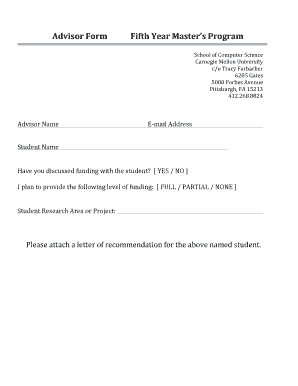
Get Advisor Form Fifth Year Masters Program.docx
How it works
-

Open form follow the instructions
-

Easily sign the form with your finger
-

Send filled & signed form or save
How to fill out the Advisor Form Fifth Year Masters Program.docx online
This guide will walk you through the process of completing the Advisor Form for the Fifth Year Masters Program. By following this step-by-step instruction, you will be able to fill out the form accurately and efficiently.
Follow the steps to complete the form online.
- Click the ‘Get Form’ button to access the form and open it in the editor.
- Begin by entering the advisor's name in the designated field. Ensure that the spelling is correct, as this will be used for official documentation.
- Next, input the advisor's email address in the corresponding field. This is essential for communication regarding the student's progress and funding details.
- Proceed to fill in the student’s name. Ensure that it matches the name registered in the university records to prevent any discrepancies.
- Indicate whether there has been a discussion regarding funding with the student by selecting 'YES' or 'NO'. This will clarify funding discussions for university administration.
- Choose the level of funding that will be provided by selecting 'FULL', 'PARTIAL', or 'NONE'. This section is crucial for outlining financial support expectations.
- In the designated area, describe the student’s research area or project. Provide relevant details that reflect the student's academic focus.
- Finally, attach a letter of recommendation for the named student, as requested. This letter is an important component of the application process.
- Once all fields are completed, make sure to save your changes, then you may download, print, or share the completed form as needed.
Complete your Advisor Form online to ensure a smooth application process.
How to write a reference letter for a master's program Open by addressing the recipient. ... Highlight the student's attributes. ... Add context with an anecdote. ... Reiterate main points in the closing. ... Include a thank you in the ending. ... Review letter for spelling and grammar. ... Academic success. ... Work ethic.
Industry-leading security and compliance
US Legal Forms protects your data by complying with industry-specific security standards.
-
In businnes since 199725+ years providing professional legal documents.
-
Accredited businessGuarantees that a business meets BBB accreditation standards in the US and Canada.
-
Secured by BraintreeValidated Level 1 PCI DSS compliant payment gateway that accepts most major credit and debit card brands from across the globe.