Get Co Electrical Permit Application - Aspen City 2018-2026
How it works
-

Open form follow the instructions
-

Easily sign the form with your finger
-

Send filled & signed form or save
How to fill out the CO Electrical Permit Application - Aspen City online
Filling out the CO Electrical Permit Application for Aspen City online may seem daunting, but with clear guidance, you can navigate the process with ease. This guide will take you through each section of the application, ensuring that you complete it accurately.
Follow the steps to successfully complete your application.
- Press the ‘Get Form’ button to access the application form and open it in your preferred online editor.
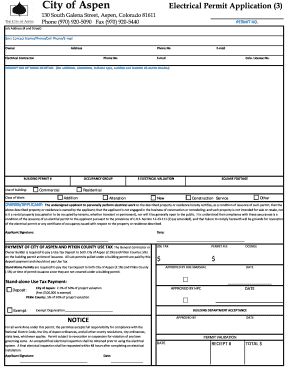
- Begin by entering the job address, including the number and street, in the designated field. This information is essential for identifying the location where the electrical work will be performed.
- In the Best Contact Name section, provide a name along with their phone number, cell phone, and email address. This ensures that the city can reach out if there are any questions regarding your application.
- Fill out the Owner section with the owner's name, address, and phone number. This should be the person who owns the property where the electrical work is to take place.
- Enter the electrical contractor's name, phone number, and email in the corresponding fields. If applicable, include the Colorado license number of the contractor as well.
- Provide a detailed description of the work being performed. This should include information on any additions or alterations, specifying the type, number, and location of circuits.
- Enter the Building Permit number if applicable, and select the Use of Building and Class of Work from the provided options. Make sure to describe whether the work is for residential, commercial, or other classifications.
- Fill in the occupancy group to specify whether it is a residential or commercial project, and provide the electrical valuation. This is a key part of determining fees associated with the permit.
- Verify that all necessary signatures are included, particularly the applicant's signature with date, certifying the applicant meets all conditions for permit issuance.
- Complete the payment section by including the necessary fee and taxes for both the City of Aspen and Pitkin County. Make sure to include all required calculations for the Use Tax.
- Once all fields are completed and accurate, save your changes, then download or print the form for your records or to share as needed.
Take the first step towards your electrical project by completing the CO Electrical Permit Application online today.
Electrical permits can seem expensive due to several factors including inspection fees, administrative costs, and the need to ensure safety standards are met. These fees support local building departments in overseeing construction projects and maintaining public safety. Investing in a CO Electrical Permit Application - Aspen City ultimately protects your investment and ensures compliance with electrical codes.