Loading
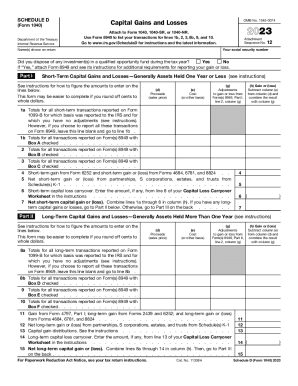
Get Schedule D (form 1040) - Report Capital Gains & Losses ...
How it works
-

Open form follow the instructions
-

Easily sign the form with your finger
-

Send filled & signed form or save
How to fill out the Schedule D (Form 1040) - Report Capital Gains & Losses online
Filing your capital gains and losses can be a straightforward process if you understand how to complete Schedule D (Form 1040) online. This guide will provide you with clear and detailed instructions to help you navigate each section of the form with confidence.
Follow the steps to fill out Schedule D accurately.
- Click ‘Get Form’ button to obtain the form and open it in your browser.
- Enter your social security number and the names shown on your return in the designated fields.
- Indicate whether you disposed of any investments in a qualified opportunity fund by selecting 'Yes' or 'No.' If 'Yes,' remember to attach Form 8949 and follow its instructions.
- In Part I, report short-term capital gains and losses for assets held one year or less. Complete the sections by entering data for proceeds, costs, adjustments, and calculating gains or losses for each transaction.
- Continue to Part II, where you will report long-term capital gains and losses for assets held for more than one year. Similar to Part I, fill out the relevant sections related to proceeds, costs, and adjustments.
- In Part III, combine the results from Part I and Part II to summarize your overall capital gain or loss. Follow the instructions for this section carefully to determine how to report the final amount on Form 1040, 1040-SR, or 1040-NR.
- Review all entries for accuracy and ensure you have filled out all required sections. Once everything is confirmed, you can save the changes, download, print, or share the completed form as needed.
Begin filling out your Schedule D (Form 1040) online today to ensure accurate reporting of your capital gains and losses.
In order to claim your capital gains exemption, complete Schedule 3 of your federal income tax return. This schedule helps you calculate your capital gains. If you are reporting a reserve from a previous year, you must also complete Form T2017 – Summary of Reserves on Dispositions of Capital Property.
Industry-leading security and compliance
US Legal Forms protects your data by complying with industry-specific security standards.
-
In businnes since 199725+ years providing professional legal documents.
-
Accredited businessGuarantees that a business meets BBB accreditation standards in the US and Canada.
-
Secured by BraintreeValidated Level 1 PCI DSS compliant payment gateway that accepts most major credit and debit card brands from across the globe.