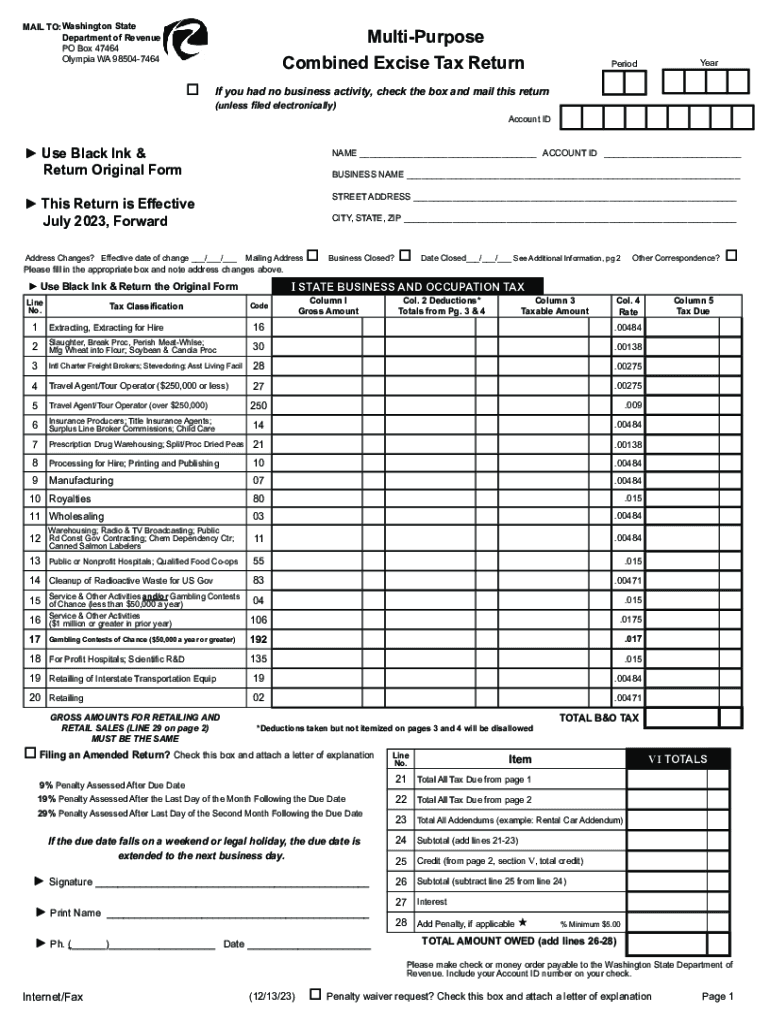
MAIL TO:Washington State Department of Revenue PO Box 47464 Olympia WA 985047464MultiPurpose Combined Excise Tax Return oYearPeriodIf you had no business activity, check the box and mail this return (unless.
Loading

Open form follow the instructions

Easily sign the form with your finger

Send filled & signed form or save
How to fill out the WA DoR Multi-Purpose Combined Excise Tax Return online
Filing the Washington State Department of Revenue Multi-Purpose Combined Excise Tax Return online is a straightforward process designed to streamline tax reporting for businesses. This guide provides a step-by-step overview to assist users in accurately completing the form and ensuring compliance with state regulations.
Follow the steps to effectively complete your Multi-Purpose Combined Excise Tax Return online.
- Press the ‘Get Form’ button to retrieve the Multi-Purpose Combined Excise Tax Return and open it in your preferred digital editor.
- Begin by entering the year and the period of the tax return at the top of the form.
- Fill in your Account ID, followed by your name and business name in the designated fields.
- Complete the street address, city, state, and ZIP code for your business location. If there are any mailing address changes, provide the effective date of the change.
- Select the appropriate tax classification and indicate if the business is closed by checking the corresponding box and providing the date closed, if applicable.
- For the Business and Occupation tax section, carefully list your gross amounts, deductions, and applicable rates for the various classifications provided, ensuring each taxable amount is calculated correctly.
- Proceed to fill out the State Sales and Use Tax section, entering necessary details such as gross amounts and deductions for retail sales and use tax.
- After entering all relevant information in the Local City and/or County Sales and Use Tax section, ensure that the total taxable amounts match the values reported in previous sections.
- In the Other Taxes section, detail any additional taxes your business might be liable for, using the designated fields for each classification.
- Complete the Credits section by listing any tax credits you are claiming and ensure all calculations are accurate.
- Before finalizing, review all sections for completeness and accuracy, including signature and contact information.
- Once all entries are verified, save your changes, then download, print, or share the completed form for submission.
Take a moment to complete your registry for the WA DoR Multi-Purpose Combined Excise Tax Return online and ensure your compliance.
Experience a faster way to fill out and sign forms on the web. Access the most extensive library of templates available.
Related content
Multi-purpose combined excise tax returns ; Effective July 1, 2023 (use for the period of...
An affidavit on the real estate excise tax form or a separate form which is signed by the...
2 days ago — The Heavy Vehicle Use Tax, Form 2290, Schedule 1, for the 2022-2023 ... the...
Get answers to your most pressing questions about US Legal Forms API.
Can you pay property taxes with a credit card in Washington state?
On-Line Payments Pay online using one of the following options: Credit Card: Pay using our merchant services provider online or by phone at 833-440-3332. Debit and credit card (MasterCard, Visa, American Express, and Discover) and electronic check (eCheck) transactions are securely processed for a fee.
Who can apply for xe8 refund?
If you are an individual with permanent impairment and can not safely use public transportation, you may be eligible to apply for a refund of a portion of the federal excise tax on the gasoline you buy. Individuals with a permanent mobility impairment.
What is federal excise tax in Canada?
The Excise Tax Act (ETA) is a federal law in Canada that administers and collects excise taxes on specific goods and services. Its primary objective is to raise revenue for the government while supporting public policy objectives such as reducing smoking or promoting environmentally friendly products.
How do I pay my CRA excise tax?
On this page Pay online. Online banking. Pre-authorized debit (PAD) payments. Debit card payments. Credit card, PayPal, Interac e-Transfer payments. Wire transfer and internationally issued credit card payments (option for non-residents) Pay in person. Pay by mail. Confirm your payment.
How do I pay my Washington state sales tax?
Paying sales and use tax Log in to My DOR. On the My DOR Services page, click on File a Consumer Use Tax Return, then follow the directions. If you don't have an online account with the Department, you can set one up by going to dor.wa.gov. Click on Log in and then Sign up. ... File a paper consumer use tax return.
What is combined excise tax return Washington State?
Combined Excise Tax This return is used for reporting your business income, sales tax, and use tax.
Is excise tax the same as GST?
Introduced in 1991, the Goods and Services Tax ("GST") is governed by Part IX of Canada's Excise Tax Act ("ETA"). The GST is a "value-added" tax system in that it is imposed on the price of most goods and services at each stage from the supply of raw material, production, distribution to the sale to the consumer.
How do I file a federal excise tax return?
To report your excise tax liability, you must: Complete Form 720, Quarterly Federal Excise Tax Return. File Form 720 electronically for immediate acknowledgement of receipt and faster service with an IRS-approved software provider.
What is Washington excise tax?
Washington's excise taxes apply to all business activities conducted in the state. Corporations, partnerships, sole proprietorships, joint ventures, nonprofit organizations, limited liability organizations, etc., conducting business in this state are all subject to these taxes, even if they do not have an office here.
Does my business need to file Form 720?
Businesses that are subject to excise tax generally must file a Form 720, Quarterly Federal Excise Tax Return to report the tax to the IRS. Many excise taxes go into trust funds for projects related to the taxed product or service, such as highway and airport improvements. Excise taxes are independent of income taxes.
Use professional pre-built templates to fill in and sign documents online faster. Get access to thousands of forms.
If you believe that this page should be taken down, please follow our DMCA take down process here.