Get Ar Ark-at-213 2012-2026
How it works
-

Open form follow the instructions
-

Easily sign the form with your finger
-

Send filled & signed form or save
How to fill out the AR ARK-AT-213 online
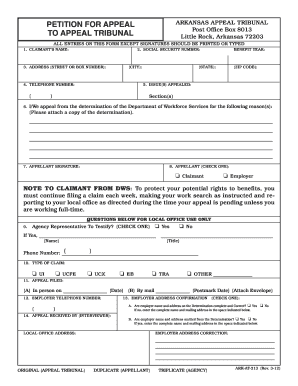
The AR ARK-AT-213 is an essential form for individuals looking to petition an appeal to the Arkansas Appeal Tribunal. This guide provides step-by-step instructions on filling out the form online, ensuring clarity and accuracy throughout the process.
Follow the steps to complete your appeal petition successfully.
- Click ‘Get Form’ button to access the AR ARK-AT-213 form and open it in your preferred online editor.
- Begin with entering your claim information. In the section titled 'Claimant’s name,' provide your full legal name.
- Next, fill in your Social Security number in the designated field to ensure identification accuracy.
- Enter your complete address, including street or box number, city, state, and zip code, in the 'Address' section.
- Provide your telephone number in the space provided, ensuring it is accurate for any communications regarding your appeal.
- Detail the issue(s) you are appealing in the designated field. Clarity and specificity are crucial here.
- State the reasons for your appeal in the designated section. Remember to attach a copy of the determination you are appealing against.
- Sign the form in the 'Appellant Signature' section, confirming that all information is correct to the best of your knowledge.
- Indicate whether you are the claimant or the employer by checking the appropriate box.
- Complete the type of claim by checking the box that corresponds to your situation: UI, UCFE, UCX, EB, TRA, or other.
- Document the date you filed the appeal, whether in person or by mail, in the appropriate section.
- Provide the employer’s telephone number if applicable.
- Confirm the employer address details by checking 'Yes' or 'No' and make necessary corrections if needed.
- Once all fields are filled accurately, you can save your changes, download the completed form, print it, or share it as needed.
Complete your AR ARK-AT-213 form online today for a smooth appeal process.
To confirm if your Arkansas unemployment claim has been processed, you can check your account online through the Arkansas Division of Workforce Services website. Additionally, confirmation notifications are typically sent via email or mail. Ensuring that you provide accurate information during the application process is crucial for smooth processing. If you have concerns, using platforms like uslegalforms can help you navigate the follow-up process effectively.