Loading
Get Just The Facts - Public School Employees' Retirement System
How it works
-

Open form follow the instructions
-

Easily sign the form with your finger
-

Send filled & signed form or save
How to fill out the Just The Facts - Public School Employees' Retirement System online
This guide provides clear, step-by-step instructions on completing the Just The Facts - Public School Employees' Retirement System form online. With a focus on ensuring accuracy and compliance, users will find this guide both comprehensive and straightforward.
Follow the steps to fill out the form accurately and efficiently.
- Click ‘Get Form’ button to obtain the form and open it in your preferred editing tool.
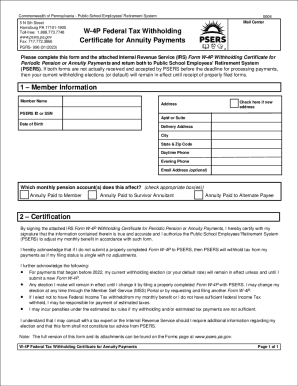
- In the Member Information section, enter your full name, PSERS ID or Social Security Number, and date of birth. Provide your new or existing address, including city, state, and ZIP code. Include your daytime and evening phone numbers and an optional email address.
- Indicate which monthly pension account(s) this form affects by checking the appropriate box for 'Annuity Paid to Member', 'Annuity Paid to Survivor Annuitant', or 'Annuity Paid to Alternate Payee'.
- In the Certification section, prepare to sign the attached IRS Form W-4P. This certifies that all information is true and accurate, allowing PSERS to adjust your monthly benefit accordingly. Be aware that failure to submit this form will result in tax withholding as if your filing status is single with no adjustments.
- Complete the IRS Form W-4P by filling in your personal information, including your first name, last name, and social security number. Review your filing status to ensure correct withholding amounts.
- Proceed to Steps 2-4 on the W-4P form if they apply to you; otherwise, continue to Step 5. Enter income from jobs and other pensions/annuities as needed.
- Claim any dependents or other credits in Step 3, which may include child tax credits or other applicable credits.
- Optional Step 4 allows for other adjustments, including additional income, deductions, and extra withholding requests. Ensure you fill in any amounts you wish to include.
- Finally, sign the form in Step 5, as your signature is required for the form to be valid. Save your changes, and then download, print, or share the completed form as necessary.
Complete your forms online today to ensure timely processing and accurate handling of your retirement benefits.
Under the law, we cannot allow you to receive any contributions and interest from your account without terminating all Pennsylvania public school employment. Therefore, PSERS may not provide you with a loan or allow you to borrow funds from your account.
Industry-leading security and compliance
US Legal Forms protects your data by complying with industry-specific security standards.
-
In businnes since 199725+ years providing professional legal documents.
-
Accredited businessGuarantees that a business meets BBB accreditation standards in the US and Canada.
-
Secured by BraintreeValidated Level 1 PCI DSS compliant payment gateway that accepts most major credit and debit card brands from across the globe.