Loading
Form preview
  • US Legal Forms
  • Other Templates
  • More Forms
  • More Multi-State Forms
  • Schedule E (form 1 Supplemental Income And Loss

Get Schedule E (form 1 Supplemental Income And Loss

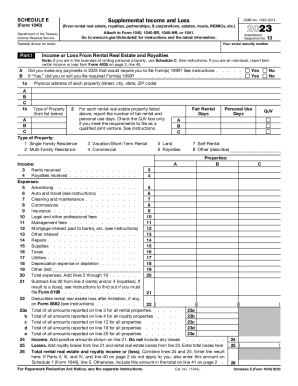
SCHEDULE E (Form 1040)Supplemental Income and LossOMB No. 15450074Attach to Form 1040, 1040SR, 1040NR, or 1041. Go to www.irs.gov/ScheduleE for instructions and the latest information.A B 1a A B C 1bAttachment Sequence.

How it works

  1. Open form

    Open form follow the instructions

  2. Easily sign form

    Easily sign the form with your finger

  3. Share form

    Send filled & signed form or save

How to fill out the Schedule E (Form 1 Supplemental Income And Loss online

This guide provides step-by-step instructions on how to effectively complete Schedule E (Form 1 Supplemental Income And Loss) online. Understanding each section of the form will help ensure that you accurately report your supplemental income and losses.

Follow the steps to complete your Schedule E online.

  1. Click the ‘Get Form’ button to obtain the form and open it in the editor.
  2. Begin filling out the top portion of the form by entering your social security number and the names of the individuals listed on the return.
  3. In Part I, provide information regarding your income or loss from rental real estate and royalties. Specify if any payments made during the year require you to file Form 1099.
  4. List the physical address of each property you are reporting. Indicate the type of property from the provided options such as Single Family Residence, Multi-Family Residence, or Commercial.
  5. For each property, report the number of fair rental days and personal use days. If applicable, check the QJV box if you qualify as a qualified joint venture.
  6. Report the income received from rents and royalties by entering amounts in the designated lines.
  7. Provide detailed information about the expenses related to your rental properties, such as advertising, repair costs, and utilities. Fill out all applicable expense lines.
  8. Calculate your total expenses and subtract them from your total rents and royalties to determine your overall income or loss.
  9. If you report any losses from rental activities, check the required boxes and attach the necessary computations as instructed.
  10. Finalize the form by ensuring all information is accurate. Save your changes, and utilize options to download, print, or share your completed Schedule E.

Start completing your documents online today for a smooth filing experience.

Get form

Experience a faster way to fill out and sign forms on the web. Access the most extensive library of templates available.
Get form

Related content

About Schedule E (Form 1040), Supplemental Income...
Jun 2, 2023 — Use Schedule E (Form 1040) to report income or loss from rental real...
Learn more
2002 Form 1040 (Schedule E)
Supplemental Income and Loss. (Form 1040). (From rental real estate, royalties...
Learn more
Toxicological Review of Tetrachloroethylene ...
Section 6 be read prior to Sections 2–5. Section 1 is the standard introduction to an...
Learn more

Related links form

Onlite L 4023 Provider Add, Delete Or Change Form - Hmaa.com Hmaa Online Prescription Drug Claim Form (Restat) - Hmaa.com

Questions & Answers

Get answers to your most pressing questions about US Legal Forms API.

Contact support

Schedule 1 (Form 1040) Additional Income and Adjustments to Income. Have additional income, such as unemployment compensation, prize or award money, gambling winnings. Have any deductions to claim, such as student loan interest deduction, self-employment tax, educator expenses.

You only pay self employment tax on a Net Profit of $400 or more. And a loss will be deducted from your other income. But Some expenses, such as home office or section 179 depreciation can only be used to reduce your schedule C taxable income to zero, and not to create a loss.

Schedule E is the form you use to report supplemental income you earn from any of the following sources: renting real estate; royalties; interests in partnerships and S corporations; and distributions received from an estate or trust as well as from certain mortgage investments.

A Schedule E does not only report income. You might use it to report a net loss from your particular business activity. Generally, when you engage in an activity for profit, the IRS limits your deductible loss to the amount you are “at-risk” for.

Even if you had a loss or a small amount of income from self-employment, it may be to your benefit to file Schedule SE and use either "optional method" in the instruc- tions for Part II of Schedule SE (dis- cussed later). You must pay SE tax if you had net earnings of $400 or more as a self-em- ployed person.

If you are self-employed, it's likely you need to fill out an IRS Schedule C to report how much money you made or lost in your business.

Who needs to file Schedule SE? If you made $400 or more this year in self-employment income, you must report your self-employment income to the IRS using Schedule SE. Exception: File if church employee income is $108.28 or more.

If the total of your net earnings from self-employment from all businesses is $400 or more, use Schedule SE (Form 1040), Self-Employment Tax to figure your self-employment income and tax owed.

Get This Form Now!

Use professional pre-built templates to fill in and sign documents online faster. Get access to thousands of forms.
Get form
If you believe that this page should be taken down, please follow our DMCA take down processhere.
Get Schedule E (Form 1 Supplemental Income And Loss
Get form
  • Adoption
  • Bankruptcy
  • Contractors
  • Divorce
  • Home Sales
  • Employment
  • Identity Theft
  • Incorporation
  • Landlord Tenant
  • Living Trust
  • Name Change
  • Personal Planning
  • Small Business
  • Wills & Estates
  • Packages A-Z
  • Affidavits
  • Bankruptcy
  • Bill of Sale
  • Corporate - LLC
  • Divorce
  • Employment
  • Identity Theft
  • Internet Technology
  • Landlord Tenant
  • Living Wills
  • Name Change
  • Power of Attorney
  • Real Estate
  • Small Estates
  • Wills
  • All Forms
  • Forms A-Z
  • Other Templates
  • Legal Hub
  • About Us
  • Help Portal
  • Legal Resources
  • Blog
  • Affiliates
  • Contact Us
  • Delete My Account
  • Site Map
  • Industries
  • Forms in Spanish
  • Localized Forms
  • State-specific Forms
  • Forms Kit
  • Real Estate Handbook
  • All Guides
  • Notarize
  • Incorporation services
  • For Consumers
  • For Small Business
  • For Attorneys
  • USLegal
  • FormsPass
  • pdfFiller
  • signNow
  • altaFlow
  • DocHub
  • Instapage
Form Packages
  • Adoption
  • Bankruptcy
  • Contractors
  • Divorce
  • Home Sales
  • Employment
  • Identity Theft
  • Incorporation
  • Landlord Tenant
  • Living Trust
  • Name Change
  • Personal Planning
  • Small Business
  • Wills & Estates
  • Packages A-Z
Form Categories
  • Affidavits
  • Bankruptcy
  • Bill of Sale
  • Corporate - LLC
  • Divorce
  • Employment
  • Identity Theft
  • Internet Technology
  • Landlord Tenant
  • Living Wills
  • Name Change
  • Power of Attorney
  • Real Estate
  • Small Estates
  • Wills
  • All Forms
  • Forms A-Z
  • Other Templates
Customer Service
  • Legal Hub
  • About Us
  • Help Portal
  • Legal Resources
  • Blog
  • Affiliates
  • Contact Us
  • Delete My Account
  • Site Map
  • Industries
  • Forms in Spanish
  • Localized Forms
  • State-specific Forms
  • Forms Kit
Legal Guides
  • Real Estate Handbook
  • All Guides
Prepared for you
  • Notarize
  • Incorporation services
Our Customers
  • For Consumers
  • For Small Business
  • For Attorneys
Our Sites
  • USLegal
  • FormsPass
  • pdfFiller
  • signNow
  • altaFlow
  • DocHub
  • Instapage
Social Media
Call us now toll free:
+1 833 426 79 33
As seen in:
© Copyright 1999-2026 airSlate Legal Forms, Inc. 17 Station Street, Ste. 203, Brookline, MA 02445
  • Your Privacy Choices
  • Terms of Service
  • Privacy Notice
  • Content Takedown Policy
  • Bug Bounty Program