Loading
Get Student Exit Interview Template
How it works
-

Open form follow the instructions
-

Easily sign the form with your finger
-

Send filled & signed form or save
How to fill out the Student Exit Interview Template online
Completing the Student Exit Interview Template online is a crucial step in your transition. This guide provides clear instructions to help you navigate each section of the form with ease.
Follow the steps to successfully complete the form.
- Click the ‘Get Form’ button to access the document and open it in your online editor.
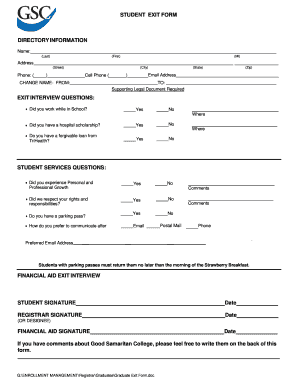
- Begin by filling in your directory information. Enter your last name, first name, and middle initial as required. Provide your full address, including street, city, state, and zip code. Additionally, include your phone number and cell phone number followed by your email address.
- Next, move on to the exit interview questions section. Indicate whether you worked while in school by selecting 'Yes' or 'No' and specify where applicable. Answer the questions regarding any hospital scholarships or forgivable loans you may have.
- In the student services questions section, respond to whether you experienced personal and professional growth, if your rights and responsibilities were respected, and whether you have a parking pass. Select 'Yes' or 'No' for each question and provide any necessary comments.
- Choose your preferred method of communication for follow-up inquiries, selecting from email, postal mail, or phone. Lastly, provide your preferred email address for communication.
- At the bottom of the form, sign and date where indicated for the student signature, registrar signature, and financial aid signature to validate your submission.
- Once you have completed all sections, save your changes, and you can choose to download, print, or share the completed form as needed.
Complete your Student Exit Interview Template online today for a seamless exit process.
Related links form
6 Exit Interview Best Practices Your Company Should Implement Schedule the Exit Interview (And Communicate The Purpose) ... Include a Neutral Party. ... Encourage Openness By Reinforcing Confidentiality. ... Guide the Conversation With Appropriate (and Useful) Questions. ... Express Excitement And Support. ... Implement The Feedback.