Loading
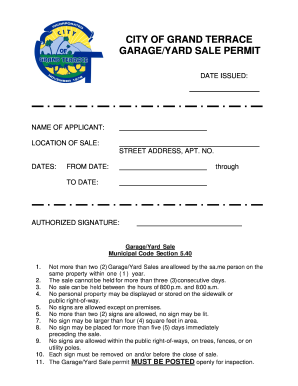
Get Ca Garage / Yard Sale Permit
How it works
-

Open form follow the instructions
-

Easily sign the form with your finger
-

Send filled & signed form or save
How to fill out the CA Garage / Yard Sale Permit online
Filling out the CA Garage / Yard Sale Permit online is a straightforward process that ensures you comply with local regulations while conducting your sale. This guide will help you navigate each section of the form with clarity and ease.
Follow the steps to complete the permit application online.
- Click ‘Get Form’ button to obtain the form and open it in the editor.
- Input your name as the applicant in the designated field. Ensure the name is accurate, as it will be used for all official communication regarding the permit.
- Enter the location of the sale by providing the correct street address, including any apartment number if applicable.
- Specify the dates of the garage or yard sale. Indicate the start date in the 'From Date' section and the end date in the 'To Date' section.
- Sign the application in the 'Authorized Signature' field. This confirms that you understand and agree to the terms outlined in the permit.
- Review all the information for accuracy before finalizing. Check the applicant name, location, and dates to ensure correctness.
- Once all fields are filled out, you can save changes, download, print, or share the completed permit application as needed.
Complete your garage or yard sale permit online today!
If you lack a yard, there are still several options for hosting a yard sale. Look into your local park or community center, as many allow residents to organize sales. If you live in an apartment building, consider setting up in a common area after checking with management. Be creative with your space; creativity can lead to a successful sale without the need for a CA Garage / Yard Sale Permit.