Get Do Not Make Any Changes To This Form - Heritage Centers
How it works
-

Open form follow the instructions
-

Easily sign the form with your finger
-

Send filled & signed form or save
How to fill out the DO NOT MAKE ANY CHANGES TO THIS FORM - Heritage Centers online
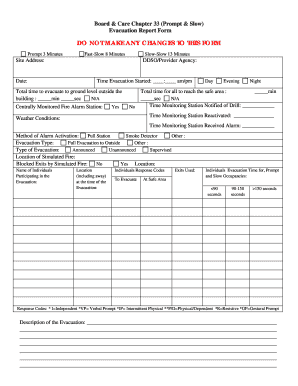
Filling out the DO NOT MAKE ANY CHANGES TO THIS FORM - Heritage Centers is a straightforward process that ensures you capture all necessary information regarding evacuation procedures. This guide will walk you through each section of the form to ensure your submission is complete and accurate.
Follow the steps to effectively complete the form online.
- Click ‘Get Form’ button to obtain the form and open it in the editor.
- Provide the site address where the evacuation drill took place. This information is crucial for identifying the location of the event.
- Enter the date of the evacuation in the specified format to record when the drill occurred.
- Fill in the name of the DDSO/Provider Agency responsible for the oversight of the evacuation. This identifies who managed the drill.
- Document the time the evacuation started, ensuring to select the correct am/pm designation.
- Record the total time taken for all individuals to evacuate to the ground level outside the building. Provide the time in minutes and seconds.
- Indicate whether the fire alarm station was centrally monitored by selecting 'Yes' or 'No'.
- Specify the total time for everyone to reach the safe area after evacuation, also in minutes and seconds.
- Document the time the monitoring station was notified of the drill and when it was reactivated.
- Describe the weather conditions during the evacuation, as this can affect the drill's execution.
- Specify how the alarm was activated. Choose from pull station, smoke detector, or other.
- Identify the type of evacuation conducted (full or other) and if it was announced or unannounced.
- List the location of the simulated fire, including if any exits were blocked.
- Document the names and locations of individuals participating in the evacuation.
- Use the Response Codes section to provide details about individual responses and evacuation times.
- Provide a description of the evacuation process followed.
- Use the Problems Noted/Correction Actions Taken section to document any issues that arose during the drill and actions taken for correction.
- List the names of the staff participating in the evacuation along with their signatures and titles.
- Complete the fire safety checklist to confirm that the evacuation proceeded according to the evacuation plan.
- Fill out the post-evacuation review section, documenting if staff were familiar with evacuation plans, exit locations, and other safety details.
- If there were no issues with the evacuation time, note that it met location requirements and document any administrator contact and actions taken as a follow-up.
- Upon finishing the form, save your changes, download a copy if needed, print it out, or share it accordingly.
Complete your form online to ensure an effective record of your evacuation drill.
Saving cultural heritage requires collaborative efforts, advocacy, and education. Raising awareness about the significance of cultural sites encourages community engagement in preservation initiatives. Partnering with heritage organizations strengthens the impact of these efforts. Additionally, using legal frameworks and resources, such as those provided by US Legal Forms, can ensure you follow necessary protocols in your preservation activities.