Loading
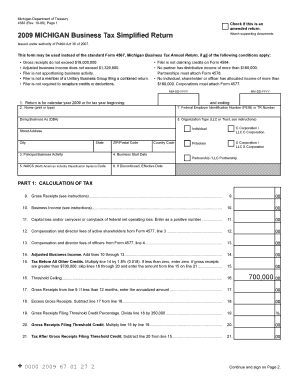
Get Reset Form Michigan Department Of Treasury 4583 (rev - Michigan
How it works
-

Open form follow the instructions
-

Easily sign the form with your finger
-

Send filled & signed form or save
How to fill out the Reset Form Michigan Department Of Treasury 4583 (Rev - Michigan online
Filling out the Reset Form Michigan Department Of Treasury 4583 can be straightforward with the right guidance. This document is intended to assist users through the process of completing the online form, emphasizing the necessary steps for accurate submission.
Follow the steps to successfully fill out the Reset Form.
- Click the ‘Get Form’ button to obtain the form and open it in the editor.
- In section 1, indicate whether the return is for the calendar year 2009 or for a tax year beginning and ending with the provided date format MM-DD-YYYY.
- Complete field 2 by entering your name either by printing or typing it directly on the form.
- For field 7, enter your Federal Employer Identification Number (FEIN) or Treasury (TR) Number, along with the Doing Business As (DBA) name if applicable in the provided space.
- Select your Organization Type, such as Individual, Corporation, or LLC, by checking the appropriate box in field 8.
- Fill out the remaining fields (3-6) by describing your principal business activity, entering the business start date, and providing your NAICS code.
- In Part 1, begin with line 9 and accurately enter your gross receipts as defined in the instructions. This includes all income from business activities.
- Proceed to line 10 and fill in your business income based on applicable guidelines and calculations provided in the detailed instructions.
- Continue filling out Part 1 by completing lines 11-21, ensuring all applicable figures are correctly calculated and totaled as guided.
- Transition to Part 2 and complete lines 22-34, which involve overpayment credits, estimated tax payments, refunds, and amounts due.
- Lastly, sign and date the tax certification section, confirming the information provided is true and complete.
- After reviewing the form for accuracy, save any changes, and proceed to download, print, or share the completed form as needed.
Complete your documents online with confidence and ensure accurate submission for your business needs.
For business taxpayers a Notice CP504 is in the mail for delinquent balances due for tax periods ending August 31, 2023 or later, and for quarterly tax return (Form 941, Employer's Quarterly Federal Tax Return) periods ending September 30, 2023, or later.
Industry-leading security and compliance
US Legal Forms protects your data by complying with industry-specific security standards.
-
In businnes since 199725+ years providing professional legal documents.
-
Accredited businessGuarantees that a business meets BBB accreditation standards in the US and Canada.
-
Secured by BraintreeValidated Level 1 PCI DSS compliant payment gateway that accepts most major credit and debit card brands from across the globe.