Loading
Get Gbs Fsa Form
How it works
-

Open form follow the instructions
-

Easily sign the form with your finger
-

Send filled & signed form or save
How to fill out the Gbs Fsa Form online
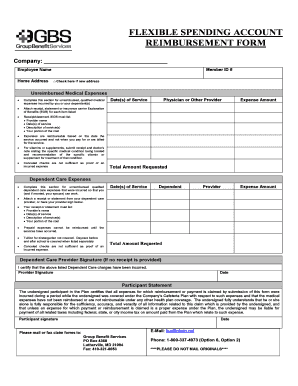
The Gbs Fsa Form is a crucial document for requesting reimbursement for eligible medical and dependent care expenses. This guide provides clear, step-by-step instructions to help users navigate and complete the form effectively online.
Follow the steps to complete the Gbs Fsa Form accurately.
- Click ‘Get Form’ button to access the Gbs Fsa Form and open it in your editing tool.
- Fill in your company name and your name as the employee. Ensure you provide your home address and Member ID number. If you have a new address, check the designated box.
- In the 'Unreimbursed Medical Expenses' section, list all qualified medical expenses incurred by you or your dependent(s). Make sure to attach receipts or statements detailing the provider's name, dates of service, descriptions of service, and your portion of the cost.
- For any vitamins or supplements, submit the appropriate receipts along with a doctor's note that specifies the medical condition being treated and a recommendation for the specific vitamin or supplement.
- Complete the fields for 'Date(s) of Service', 'Physician or Other Provider', and 'Expense Amount' for each item listed. Finally, calculate and enter the 'Total Amount Requested'.
- In the 'Dependent Care Expenses' section, document all unreimbursed care expenses incurred so that you and your partner can work. Attach receipts or have your dependent care provider validate the charges with their signature.
- Similar to the medical section, include the 'Date(s) of Service', 'Dependent', 'Provider', and 'Expense Amount'. Also, calculate and write down the 'Total Amount Requested'.
- Obtain your dependent care provider's signature if no receipt is provided, confirming that the charges have been incurred.
- For the participant statement, read through the certification clause carefully. You will need to sign and date this section, affirming the accuracy of all the information provided.
- After completing the form, you can choose to save your changes, download, print, or share the Gbs Fsa Form as needed.
Complete your Gbs Fsa Form online today for a hassle-free reimbursement experience.
The name & address of the vendor providing the goods or services. The date that the specific services were received or items were purchased. Itemization of the services and/or goods and pricing. Final amount due and evidence that it was paid.