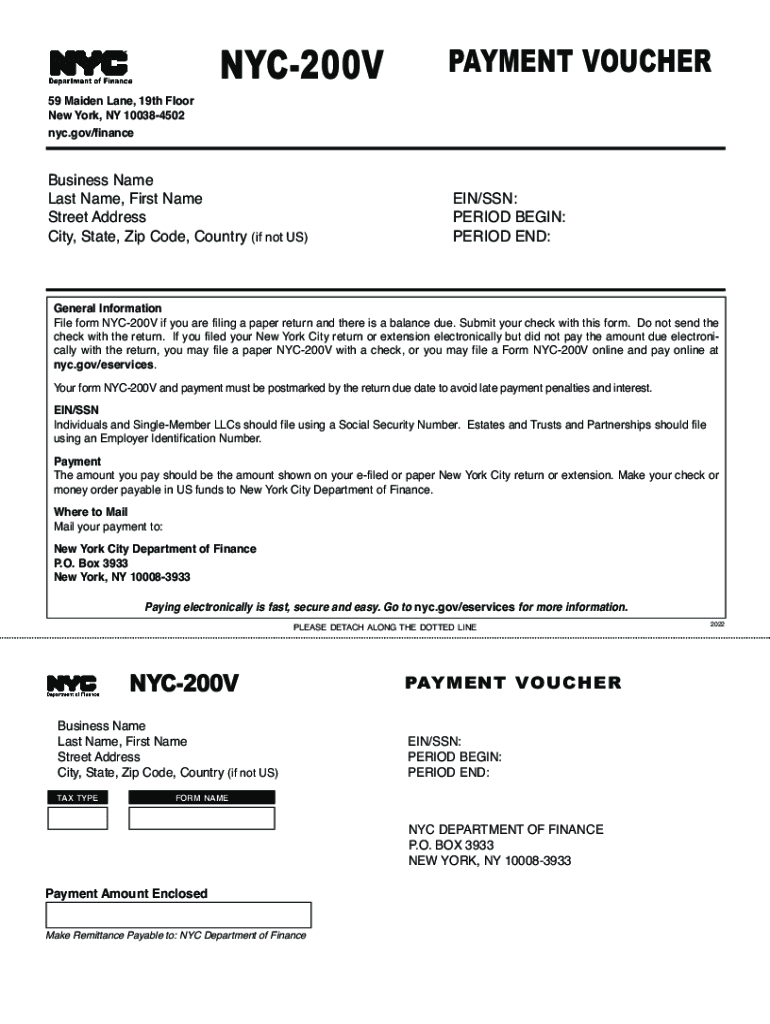
SN: PERIOD BEGIN: PERIOD END: General Information File form NYC-200V if you are filing a paper return and there is a balance due. Submit your check with this form. Do not send the check with the return. If you filed your New York City return or extension electronically but did not pay the amount due electronically with the return, you may file a paper NYC-200V with a check, or you may file a Form NYC-200V online and pay online at nyc.gov/eservices. Your form NYC-200V and payment must be postmar.
Loading

Open form follow the instructions

Easily sign the form with your finger

Send filled & signed form or save
How to fill out the Nyc 200v online
Filing the Nyc 200v is an essential step for individuals and businesses with a balance due when submitting their tax returns. This guide provides detailed instructions on how to fill out this payment voucher online, ensuring a smooth and accurate process.
Follow the steps to complete the Nyc 200v form online.
- Click the ‘Get Form’ button to access the Nyc 200v and open it in the online editor.
- Enter your business name and your last name, followed by your first name. This identification is essential for processing your payment.
- Provide your street address, followed by your city, state, and zip code. If applicable, include your country.
- Indicate your EIN or SSN. Note that individuals and single-member LLCs should use their Social Security Number, while estates, trusts, and partnerships must enter their Employer Identification Number.
- Fill out the period begin and period end fields to specify the timeframe for which you are making this payment.
- In the payment amount enclosed section, ensure that you accurately enter the total amount due as shown on your e-filed or paper New York City return or extension.
- Once all fields are completed, review the information to ensure accuracy. Save any changes you have made.
- Finally, choose to download, print, or share the completed form for your records and submission.
Complete your Nyc 200v form online today for a hassle-free tax filing experience.
Experience a faster way to fill out and sign forms on the web. Access the most extensive library of templates available.
Related content
... Form nYc-200V online and pay online at nyc.gov/eservices. Your form nYc-200V and...
Mar 29, 2017 — less than 200-lb (90-kg) tensile strength. Leave at least 12 ... state...
Petrides school application form 2015. Consultar puntos dgt online jobs ... Ira rennert...
Get answers to your most pressing questions about US Legal Forms API.
What is nyc sales tax 2023?
The New York (NY) state sales tax rate is currently 4%. Depending on local municipalities, the total tax rate can be as high as 8.875%.
Who must file NYC 4S?
FILE FORM NYC-4S Corporations (as defined in Section 11- 602.1 of the New York City Administra- tive Code) doing business, employing capital, or owning or leasing property in a corporate or organized capacity, or main- taining an office in New York City must file a General Corporation Tax return. Instructions for Form NYC-4S nyc.gov https://.nyc.gov › finance › downloads › pdf › gct nyc.gov https://.nyc.gov › finance › downloads › pdf › gct
What is a NYC 200V?
NYC-200V - Payment Voucher for Tax Returns and Extensions Create a customized payment voucher by logging onto your e-Services account or download a generic NYC-200V Payment Voucher.
What is NYC tax rate?
New York has a 4.00 percent state sales tax rate, a max local sales tax rate of 4.875 percent, and an average combined state and local sales tax rate of 8.52 percent. New York's tax system ranks 49th overall on our 2023 State Business Tax Climate Index.
What is NYC sales tax rate?
New York City local sales and use tax rate of 4.5 percent. New York State sales and use tax rate of 4.0 percent. Metropolitan Commuter Transportation District surcharge of 0.375 percent.
Who must file NYC corporate tax return?
Corporations that do business, employ capital, or own or lease property, or maintain an office in the city in a corporate or organized capacity must pay this tax. Business Corporation Tax - NYC.gov nyc.gov https://.nyc.gov › site › finance › taxes › business-c... nyc.gov https://.nyc.gov › site › finance › taxes › business-c...
How is NYC UBT calculated?
NYC imposes UBT at a rate of 4% on any unincorporated business—that is, any trade or business engaged in or conducted by an individual (sole proprietorship) or unincorporated entity, including a partnership or LLC.
Who qualifies for the NYC School tax credit?
NYC School Tax Credit: This credit is available to New York City residents who are not dependents claimed on another taxpayer's federal income tax return, or residents who live in New York City for part of the year. If you're married, file jointly, and earn $250,000 or less, you can get a refundable credit of $125. NYC Taxes Benefits Guide: Tax Credits and Deductions documentedny.com https://documentedny.com › 2023/03/29 › nyc-taxes-ben... documentedny.com https://documentedny.com › 2023/03/29 › nyc-taxes-ben...
What is NYC income tax rate?
New York City's income tax system is also progressive and rates range from 3.078% to 3.876%. How many allowances should you claim? Most people claim 0-5 allowances, check W-4 rules for details. Your withholdings can't exceed your income.
What is NYC 400 form?
An amended form should be filed, if necessary, to correct the tax estimate and related payments. Use Form NYC-400 for the amendment. If the amendment is made after the 15th day of the 9th month of the taxable year, any increase in tax must be paid with the amendment.
Use professional pre-built templates to fill in and sign documents online faster. Get access to thousands of forms.
If you believe that this page should be taken down, please follow our DMCA take down process here.