Loading
Form preview
  • US Legal Forms
  • Other Templates
  • More Forms
  • More Multi-State Forms
  • Nys Income Tax Forms

Get Nys Income Tax Forms

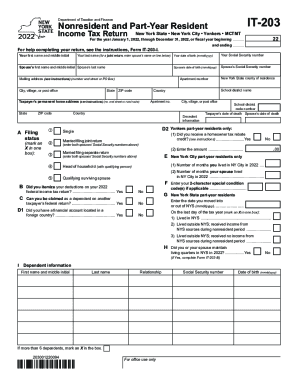
Ember 31, 2022, or fiscal year beginning ............ and ending ............ For help completing your return, see the instructions, Form IT-203-I. Your first name and middle initial Your last name (for a joint return, enter spouse s name on line below) Your date of birth (mmddyyyy) Spouse s first name and middle initial Spouse s last name Spouse s date of birth (mmddyyyy) Mailing address (see instructions) (number and street or PO Box) City, village, or post office State Apartmen.

How it works

  1. Open form

    Open form follow the instructions

  2. Easily sign form

    Easily sign the form with your finger

  3. Share form

    Send filled & signed form or save

How to fill out the Nys Income Tax Forms online

Filing your New York State Income Tax Form IT-203 online can streamline the process and ensure accuracy. This guide provides a clear, step-by-step approach for users of all experience levels to successfully complete their forms.

Follow the steps to fill out your Nys Income Tax Forms efficiently.

  1. Select the 'Get Form' button to access the form in your preferred digital format.
  2. Begin by entering your personal information. This includes your first and last name, date of birth, and Social Security number. For joint returns, include your partner’s information in the designated fields.
  3. In the mailing address section, provide the complete address where you wish to receive correspondence, making sure to include the city, state, and ZIP code.
  4. Determine your filing status by selecting the appropriate box, such as single, married filing jointly, or head of household. Ensure you accurately reflect your situation for correct processing.
  5. Proceed to report your income. Carefully fill in the required fields for wages, interest, dividends, and other income sources as indicated. Provide whole dollar amounts only.
  6. If applicable, identify any adjustments to your federal adjusted gross income. Follow the instructions closely to ensure the correct calculations.
  7. Next, choose between a standard deduction or itemizing deductions. Mark your selection and fill in the respective amounts.
  8. Carefully enter any dependent information if you are claiming dependents. Include their names, Social Security numbers, and dates of birth.
  9. Complete the sections for tax credits and payments. Review the available credits such as the New York State child and dependent care credit and ensure you input any tax payments made during the year.
  10. Finally, review all the information for accuracy. Once confirmed, you can choose to save your changes, download your completed form, print it, or share it as needed.

Take control of your finances by completing your Nys Income Tax Forms online today!

Get form

Experience a faster way to fill out and sign forms on the web. Access the most extensive library of templates available.
Get form

Related content

Income tax forms - Tax.NY.gov
Nov 4, 2022 — Commonly used income tax forms and instructions · Full-year resident...
Learn more
Form IT-2104 Employee's Withholding Allowance...
... form to the New York State Tax Department.) Employer identification number. Employee:...
Learn more
Form IT-203-I:2017:Instructions for From IT-203...
If you do file a paper return, you may need these additional forms, as well as credit...
Learn more

Related links form

CAIC Critical Illness Wellness - Mark III Brokerage Accidental Death Claim Form Penfed Direct Deposit Form Young Professional Nomination Form - Greater Mankato Growth

Questions & Answers

Get answers to your most pressing questions about US Legal Forms API.

Contact support

You must file Form IT-201, Resident Income Tax Return, if you were a New York State resident for the entire year.

If one of you was a New York State resident and the other was a nonresident or part-year resident, you must each file a separate New York return. The resident must use Form IT-201. The nonresident or part-year resident, if required to file a New York State return, must use Form IT-203.

Free File Fillable Forms are electronic federal tax forms you can fill out and file online for free, enabling you to: Choose the income tax form you need. Enter your tax information online. Electronically sign and file your return.

What is the New York State Tax Form 201? The State Tax Form 201, also known as IT-201, is the standard income tax return form for New York State residents. This form is used to report income, calculate tax liability, and claim credits or deductions. Think of it as the New York equivalent of the federal Form 1040.

If one of you was a New York State resident and the other was a nonresident or part-year resident, you must each file a separate New York return. The resident must use Form IT-201. The nonresident or part-year resident, if required to file a New York State return, must use Form IT-203.

If you are trying to locate, download, or print state of New York state tax forms, you can do so on the New York Department of Taxation website.

Form IT-201, Resident Income Tax Return.

The IT-201 is the main income tax form for New York State residents. It is analogous to the US Form 1040, but it is four pages long, instead of two pages. The first page of IT-201 is mostly a recap of information that flows directly from the federal tax forms.

Get This Form Now!

Use professional pre-built templates to fill in and sign documents online faster. Get access to thousands of forms.
Get form
If you believe that this page should be taken down, please follow our DMCA take down processhere.
Get Nys Income Tax Forms
Get form
  • Adoption
  • Bankruptcy
  • Contractors
  • Divorce
  • Home Sales
  • Employment
  • Identity Theft
  • Incorporation
  • Landlord Tenant
  • Living Trust
  • Name Change
  • Personal Planning
  • Small Business
  • Wills & Estates
  • Packages A-Z
  • Affidavits
  • Bankruptcy
  • Bill of Sale
  • Corporate - LLC
  • Divorce
  • Employment
  • Identity Theft
  • Internet Technology
  • Landlord Tenant
  • Living Wills
  • Name Change
  • Power of Attorney
  • Real Estate
  • Small Estates
  • Wills
  • All Forms
  • Forms A-Z
  • Other Templates
  • Legal Hub
  • About Us
  • Help Portal
  • Legal Resources
  • Blog
  • Affiliates
  • Contact Us
  • Delete My Account
  • Site Map
  • Industries
  • Forms in Spanish
  • Localized Forms
  • State-specific Forms
  • Forms Kit
  • Real Estate Handbook
  • All Guides
  • Notarize
  • Incorporation services
  • For Consumers
  • For Small Business
  • For Attorneys
  • USLegal
  • FormsPass
  • pdfFiller
  • signNow
  • altaFlow
  • DocHub
  • Instapage
Form Packages
  • Adoption
  • Bankruptcy
  • Contractors
  • Divorce
  • Home Sales
  • Employment
  • Identity Theft
  • Incorporation
  • Landlord Tenant
  • Living Trust
  • Name Change
  • Personal Planning
  • Small Business
  • Wills & Estates
  • Packages A-Z
Form Categories
  • Affidavits
  • Bankruptcy
  • Bill of Sale
  • Corporate - LLC
  • Divorce
  • Employment
  • Identity Theft
  • Internet Technology
  • Landlord Tenant
  • Living Wills
  • Name Change
  • Power of Attorney
  • Real Estate
  • Small Estates
  • Wills
  • All Forms
  • Forms A-Z
  • Other Templates
Customer Service
  • Legal Hub
  • About Us
  • Help Portal
  • Legal Resources
  • Blog
  • Affiliates
  • Contact Us
  • Delete My Account
  • Site Map
  • Industries
  • Forms in Spanish
  • Localized Forms
  • State-specific Forms
  • Forms Kit
Legal Guides
  • Real Estate Handbook
  • All Guides
Prepared for you
  • Notarize
  • Incorporation services
Our Customers
  • For Consumers
  • For Small Business
  • For Attorneys
Our Sites
  • USLegal
  • FormsPass
  • pdfFiller
  • signNow
  • altaFlow
  • DocHub
  • Instapage
Social Media
Call us now toll free:
+1 833 426 79 33
As seen in:
© Copyright 1999-2026 airSlate Legal Forms, Inc. 17 Station Street, Ste. 203, Brookline, MA 02445
  • Your Privacy Choices
  • Terms of Service
  • Privacy Notice
  • Content Takedown Policy
  • Bug Bounty Program