Loading
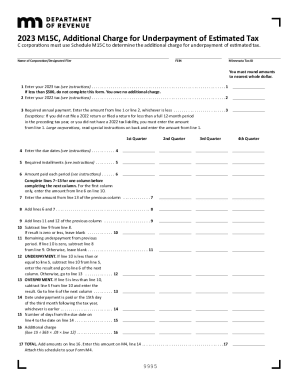
Get M15c - Fill Out And Sign Printable Pdf Template
How it works
-

Open form follow the instructions
-

Easily sign the form with your finger
-

Send filled & signed form or save
How to use or fill out the M15C - Fill Out And Sign Printable PDF Template online
Filling out the M15C form accurately is essential for C corporations to determine the additional charge for underpayment of estimated tax. This guide provides a supportive and clear step-by-step approach to help users navigate through the PDF template seamlessly.
Follow the steps to fill out the M15C form effectively.
- Click the ‘Get Form’ button to obtain the M15C form and open it in your preferred PDF editor.
- Enter the name of the corporation or designated filer in the designated field at the top of the form.
- Input the Federal Employer Identification Number (FEIN) in the specified field.
- Provide the Minnesota Tax ID number in the indicated section.
- Proceed to line 1 and enter your 2023 tax amount, ensuring to round to the nearest whole dollar.
- If the amount in line 1 is less than $500, do not continue filling out the form, as no additional charge is owed.
- For line 2, input your 2022 tax amount, following the same rounding instructions.
- Calculate your required annual payment by entering the lesser amount from line 1 or line 2 on line 3.
- Fill in the due dates for the required installments on line 4, following the instructions for frequency.
- On line 5, indicate the required installments, which are typically 25 percent of the amount on line 3 unless using an alternative method.
- Enter the amounts paid for each period on line 6, noting to attach any prior overpayment credits.
- Complete lines 7 through 13 for the first column, then move to subsequent columns as instructed.
- After finishing the calculations on lines 10 through 13, enter any additional charge amount on line 16.
- Add the amounts from line 16 to get the total on line 17, which should be transferred to your M4 form.
- Review the completed form thoroughly for accuracy, then save the changes, and proceed to download, print, or share the form.
Take action today and complete your M15C form online for a hassle-free experience.