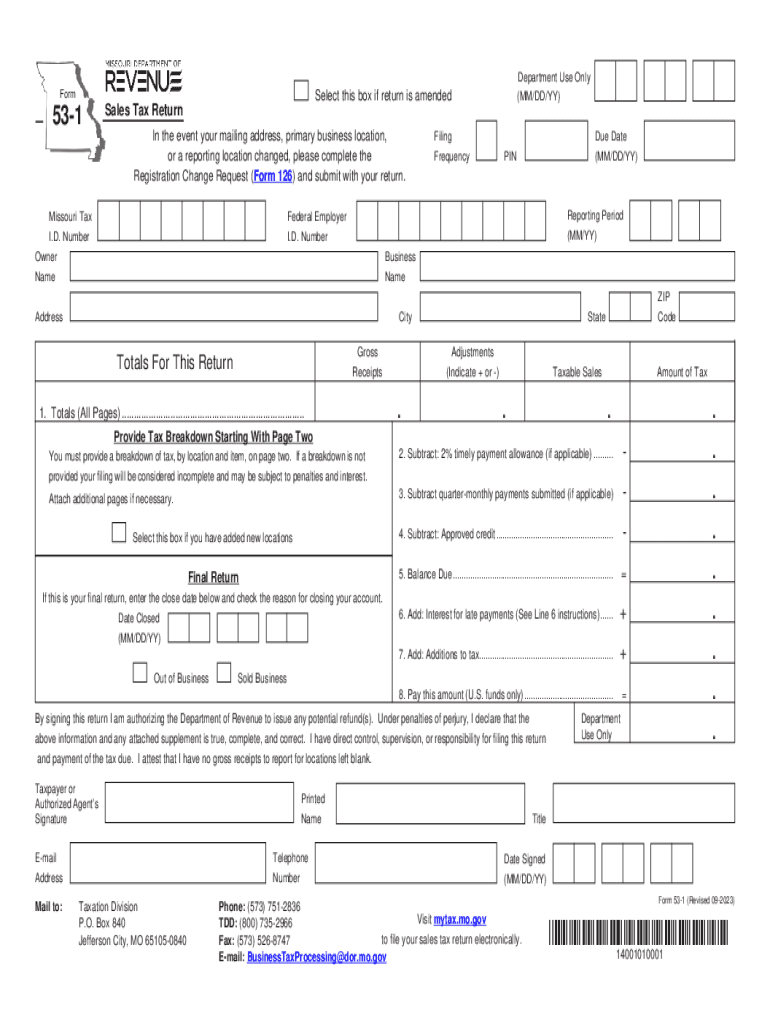
Reset Form Form531Print FormDepartment Use Only (MM/DD/YY)Select this box if return is amendedSales Tax Return In the event your mailing address, primary business location, or a reporting location.

Open form follow the instructions

Easily sign the form with your finger

Send filled & signed form or save
How to fill out the MO DoR Form 53-1 online
Filling out the MO DoR Form 53-1 online can seem daunting, but with this comprehensive guide, you will find clear steps to complete the form efficiently. This guide aims to provide you with a straightforward approach to ensure that all necessary sections are accurately filled out.
Follow the steps to complete the MO DoR Form 53-1 online.
- Click the 'Get Form' button to access the form and open it for editing.
- Begin by entering your Missouri Tax I.D. Number, Federal Employer I.D. Number, and filing frequency if known. Review the due date and reporting period fields to confirm they are correct.
- Provide your owner and business name along with the complete address, including city, state, and ZIP code. If any of these have changed, be sure to complete the Registration Change Request (Form 126).
- On Line 1, enter the totals for gross receipts, adjustments, taxable sales, and amount of tax due from all pages. Ensure that a breakdown of tax by location and item is provided as instructed.
- If applicable, check the box to indicate if you have added new locations and provide details for these on the subsequent pages.
- Complete lines 2 through 8 by calculating any allowances, payments, and final tax due as per the guidelines provided in the instructions. Ensure to calculate any interests and additions to tax accurately.
- If this is your final return, enter the close date and specify the reason for closure of your account.
- Sign the form, providing your printed name, title, email, telephone number, and the date of signing. Make sure to authorize the Department of Revenue to issue any potential refunds.
- Once all fields are filled out, save the changes you have made, and review the form for completeness to avoid potential penalties. You can then download, print, or share the completed form as needed.
Start filling out your MO DoR Form 53-1 online today to ensure your sales tax return is submitted accurately and on time.
Experience a faster way to fill out and sign forms on the web. Access the most extensive library of templates available.
Related content
Sales Tax Return (Form 53-1) Instructions. * ... Page Totals – Enter the total gross...
Sales Tax Return and Instructions ... 157. 159. 163. Missouri Sales/Use Tax ... C- Annual...
In this section, we explore the vital process of understanding the core needs that shape...
Get answers to your most pressing questions about US Legal Forms API.
How do I avoid paying sales tax on a car in Missouri?
the vehicle is less than eleven years old and the mileage is less than 150,000 miles; you are a resident of a state other than Missouri; or. you are obtaining a temporary permit for a trailer.
How do I get a sales tax waiver in Missouri?
You may be entitled to a tax waiver if one of the following applies: A new Missouri resident. First licensed asset you have ever owned. You did not own any personal property on January 1st of the prior year. You are in the military and your home of record is not Missouri (LES papers are required)
What is subject to Missouri sales tax?
All sales of tangible personal property and taxable services are generally presumed taxable unless specifically exempted by law. Persons making retail sales collect the sales tax from the purchaser and remit the tax to the Department of Revenue. The state sales tax rate is 4.225%.
Who is exempt from Missouri sales tax?
Any social, civic, religious, political subdivision, or educational organization can apply for a sales tax exemption by completing Form 1746PDF Document, Missouri Sales Tax Exemption Application. This form lists the information needed to verify the organization is indeed a tax-exempt non-profit organization. Sales Tax Taxability and Exemptions - Missouri Department of Revenue mo.gov https://dor.mo.gov › faq › taxation › business › sales-use... mo.gov https://dor.mo.gov › faq › taxation › business › sales-use...
Can you make payments on sales tax in Missouri?
The Missouri Department of Revenue (DOR) offers payment plans to qualifying taxpayers who cannot afford to pay their personal or business tax bills in full. Missouri DOR Tax Payment Plan: Guide to Qualify & Setup - TaxCure taxcure.com https://taxcure.com › state-taxes › missouri › payment-plan taxcure.com https://taxcure.com › state-taxes › missouri › payment-plan
What makes someone exempt from taxes?
To be exempt from withholding, both of the following must be true: You owed no federal income tax in the prior tax year, and. You expect to owe no federal income tax in the current tax year.
How much is sales tax on a vehicle in Missouri?
4.225% Missouri Charges an Auto Sales Tax of 4.225% of the Sales Price you Paid for your Car of Truck. Note that, if you traded in your car or truck, subtract the offered deduction from the sales price to figure out the amount for which you will be taxed. What to Know About the Missouri Car Sales Tax - Beuckman Ford bobeuckmanford.com https://.bobeuckmanford.com › what-to-know-abou... bobeuckmanford.com https://.bobeuckmanford.com › what-to-know-abou...
How do I file a sales tax return in Missouri?
You have three options for filing and paying your Missouri sales tax: File online – File online at the Missouri Department of Revenue. ... File by mail – You can use Form 53-1 and file and pay through the mail. ... AutoFile – Let TaxJar automate your sales tax filing and remittance. Missouri Sales Tax Guide and Calculator 2022 - TaxJar taxjar.com https://.taxjar.com › sales-tax › missouri taxjar.com https://.taxjar.com › sales-tax › missouri
Use professional pre-built templates to fill in and sign documents online faster. Get access to thousands of forms.
If you believe that this page should be taken down, please follow our DMCA take down process here.
This form is available in several versions. Select the version you need from the drop-down list below.