Loading
Form preview
  • US Legal Forms
  • Other Templates
  • Other Forms
  • California Other Forms
  • Ca Alarm Permit Application/information Update - City Of Upland

Get Ca Alarm Permit Application/information Update - City Of Upland

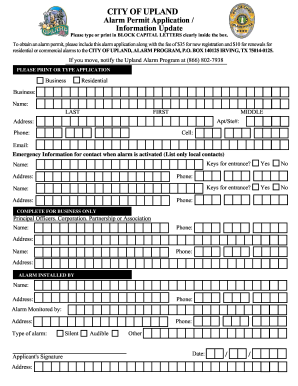
Ion along with the fee of $35 for new registration and $10 for renewals for residential or commercial alarms to the CITY OF UPLAND, ALARM PROGRAM, P.O. BOX 140125 IRVING, TX 75014-0125. If you move, notify the Upland Alarm Program at (866) 802-7938 PLEASE PRINT OR TYPE APPLICATION Business Residential Business: Name: LAST FIRST Address: MIDDLE Apt/Ste#: A Phone: Cell: Email: Emergency Information for contact when alarm is activated (List only local contacts) Name: Address: Keys for e.

How it works

  1. Open form

    Open form follow the instructions

  2. Easily sign form

    Easily sign the form with your finger

  3. Share form

    Send filled & signed form or save

How to fill out the CA Alarm Permit Application/Information Update - City of Upland online

Filling out the CA Alarm Permit Application/Information Update is an essential step in securing an alarm permit for your business or residence. This guide will provide you with clear, step-by-step instructions on how to complete the form online effectively.

Follow the steps to complete the application with ease.

  1. Click ‘Get Form’ button to obtain the form and open it in the editor.
  2. Begin by selecting whether your application is for a business or residential alarm. This option is usually presented at the top of the form.
  3. Enter the name of the business or your full name if the application is for a residence. Be sure to fill in your last name, first name, and middle name, if applicable.
  4. Provide the full address, including any apartment or suite number, to identify your location accurately.
  5. Fill out the contact information fields, including your phone number, cell number, and email address to ensure the program can reach you.
  6. List local emergency contacts that can be reached in case the alarm is activated. Include their name, address, and phone number. It is crucial to have reliable contacts available.
  7. Indicate whether you possess keys for entrance to your property, answering 'Yes' or 'No'. This is important for emergency response measures.
  8. If this application is for a business, complete the section regarding principal officers, corporation, partnership, or association details. Provide the required names, addresses, and phone numbers.
  9. Fill out the details of the alarm installer, including their name, address, and phone number. Specify the type of alarm installed (silent, audible, or other).
  10. Review the entire application for completeness and accuracy. Ensure all sections are filled out clearly in block letters.
  11. Once you are satisfied with the application, you can save changes, download, print, or share the completed form for submission.

Complete your CA Alarm Permit Application/Information Update online today for a smoother experience.

Get form

Experience a faster way to fill out and sign forms on the web. Access the most extensive library of templates available.
Get form

Related content

Upland Police Department - Alarm Program
Alarm Permit Application; |; Upland Alarm Ordinance; |; Request to call back ... City of...
Learn more
ANNUAL SECURITY & FIRE SAFETY REPORT 2024
On behalf of the members of the Department of Campus Safety, I want to thank you for your...
Learn more
Green Remediation Best Management Practices
This fact sheet provides an update on information compiled in the December 2009 “Site...
Learn more

Related links form

Flipkart Mobile Bill Pdf Download Tour Request Form - Odessa College - Odessa Verification Certificate Sitma B Wrap

Questions & Answers

Get answers to your most pressing questions about US Legal Forms API.

Contact support

To obtain a Ring Alarm certificate, you typically need to register your device with local authorities. Start by completing the CA Alarm Permit Application/Information Update - City of Upland, providing the necessary information about your alarm system. Once approved, you will receive a certificate that you should keep on hand for insurance purposes and to confirm the legitimacy of your alarm system.

A Ring Alarm system can benefit a variety of users, including homeowners, renters, and small business owners. It provides security by monitoring your property and alerting you to potential intrusions. Additionally, the system is easy to install, making it accessible for anyone looking to enhance their security. Consider your specific security needs and how a Ring Alarm can fit into your overall safety plan.

You need an alarm permit if your home or business has an alarm system installed. Each city has different regulations, but in general, systems that alert local authorities typically require registration. To find out if you need a permit, check the regulations specific to your area, such as the CA Alarm Permit Application/Information Update - City of Upland. If in doubt, reach out to local law enforcement for clarification.

Yes, a Ring Alarm can often help reduce your home insurance premiums. Insurance companies typically offer discounts when you have a monitored alarm system in place. However, always check with your insurer to verify their specific policies on systems like the Ring Alarm. For more details about home insurance and alarms, consult with your insurance provider.

Getting a Ring alarm permit is a straightforward process. First, visit your local city’s website to find the CA Alarm Permit Application/Information Update - City of Upland. You will usually need to provide information about your Ring system and your home. After completing the application, submit it according to your city's guidelines, and keep a copy for your records.

Yes, you typically need an alarm permit in California, including the City of Upland. This permit allows local authorities to track alarm systems and respond effectively to any emergency situations. Obtaining a permit helps ensure that your alarm system is registered, which can prevent any fines from false alarms. To learn more about the CA Alarm Permit Application/Information Update - City of Upland, visit the official website or consult with local law enforcement.

While not all home insurance companies require an alarm system, having one can lower your premiums and provide better coverage. It offers peace of mind that your property is protected against break-ins and other threats. Completing the CA Alarm Permit Application/Information Update - City of Upland can demonstrate to insurers that you are committed to securing your premises.

In California, installing alarm systems typically requires a contractor's license specifically for alarm work. This ensures that installations meet safety and quality standards. If you're pursuing the CA Alarm Permit Application/Information Update - City of Upland, it may be beneficial to work with licensed professionals to ensure compliance and smooth application processing.

An alarm certificate serves as official documentation showing that your alarm system is registered and compliant with local regulations. You may need it for various reasons, such as ensuring your alarm system functions properly or meeting your insurance requirements. For those applying for the CA Alarm Permit Application/Information Update - City of Upland, this certificate confirms your commitment to safety.

A false alarm in security refers to an alarm event that activates without an actual security threat being present. This can occur due to user error, system malfunction, or environmental factors. Familiarizing yourself with the CA Alarm Permit Application/Information Update - City of Upland will equip you with the knowledge to mitigate these occurrences.

Get This Form Now!

Use professional pre-built templates to fill in and sign documents online faster. Get access to thousands of forms.
Get form
If you believe that this page should be taken down, please follow our DMCA take down processhere.
Get CA Alarm Permit Application/Information Update - City of Upland
Get form
  • Adoption
  • Bankruptcy
  • Contractors
  • Divorce
  • Home Sales
  • Employment
  • Identity Theft
  • Incorporation
  • Landlord Tenant
  • Living Trust
  • Name Change
  • Personal Planning
  • Small Business
  • Wills & Estates
  • Packages A-Z
  • Affidavits
  • Bankruptcy
  • Bill of Sale
  • Corporate - LLC
  • Divorce
  • Employment
  • Identity Theft
  • Internet Technology
  • Landlord Tenant
  • Living Wills
  • Name Change
  • Power of Attorney
  • Real Estate
  • Small Estates
  • Wills
  • All Forms
  • Forms A-Z
  • Other Templates
  • Legal Hub
  • About Us
  • Help Portal
  • Legal Resources
  • Blog
  • Affiliates
  • Contact Us
  • Delete My Account
  • Site Map
  • Industries
  • Forms in Spanish
  • Localized Forms
  • State-specific Forms
  • Forms Kit
  • Real Estate Handbook
  • All Guides
  • Notarize
  • Incorporation services
  • For Consumers
  • For Small Business
  • For Attorneys
  • USLegal
  • FormsPass
  • pdfFiller
  • signNow
  • altaFlow
  • DocHub
  • Instapage
Form Packages
  • Adoption
  • Bankruptcy
  • Contractors
  • Divorce
  • Home Sales
  • Employment
  • Identity Theft
  • Incorporation
  • Landlord Tenant
  • Living Trust
  • Name Change
  • Personal Planning
  • Small Business
  • Wills & Estates
  • Packages A-Z
Form Categories
  • Affidavits
  • Bankruptcy
  • Bill of Sale
  • Corporate - LLC
  • Divorce
  • Employment
  • Identity Theft
  • Internet Technology
  • Landlord Tenant
  • Living Wills
  • Name Change
  • Power of Attorney
  • Real Estate
  • Small Estates
  • Wills
  • All Forms
  • Forms A-Z
  • Other Templates
Customer Service
  • Legal Hub
  • About Us
  • Help Portal
  • Legal Resources
  • Blog
  • Affiliates
  • Contact Us
  • Delete My Account
  • Site Map
  • Industries
  • Forms in Spanish
  • Localized Forms
  • State-specific Forms
  • Forms Kit
Legal Guides
  • Real Estate Handbook
  • All Guides
Prepared for you
  • Notarize
  • Incorporation services
Our Customers
  • For Consumers
  • For Small Business
  • For Attorneys
Our Sites
  • USLegal
  • FormsPass
  • pdfFiller
  • signNow
  • altaFlow
  • DocHub
  • Instapage
Social Media
Call us now toll free:
+1 833 426 79 33
As seen in:
© Copyright 1999-2026 airSlate Legal Forms, Inc. 17 Station Street, Ste. 203, Brookline, MA 02445
  • Your Privacy Choices
  • Terms of Service
  • Privacy Notice
  • Content Takedown Policy
  • Bug Bounty Program